Dashboard Revisions — Take 2

28 Responses (page 1 of 2)

  1. Kerem Suer Kerem Suer

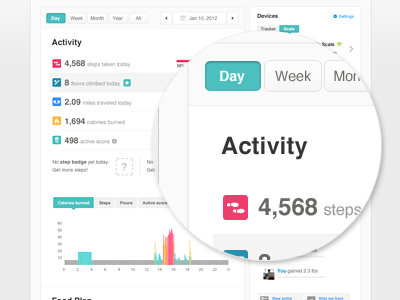
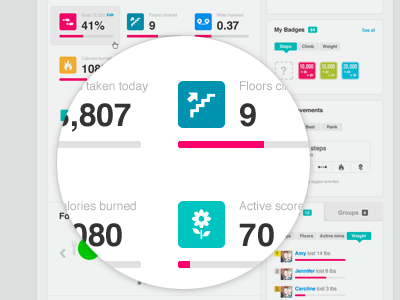
    Taking one step back and trying to maintain the current layout we have. Also working on couple new features that will be released later this month or so. Let me know what you think.
    likes

    over 1 year ago

  2. Shaun Moynihan Shaun Moynihan

    Nice, really liking this one as well. What is the grey bar at the bottom of the chart on the left?

    over 1 year ago

  3. Ted Goas Ted Goas

    Love the user of color, Kerem. Are the colors in the activity icons built on an established color scheme throughout the site/app?

    over 1 year ago

  4. Kerem Suer Kerem Suer

    Thanks ladies.

    Shaun, that's your calorie burn graph, grey area is sedentary, pink is very active, orange fairly active and teal lightly active.

    Ted, yes we do color code activities throughout our web and mobile apps.

    over 1 year ago

  5. Hunter Hastings Hunter Hastings

    Fantastic work as always. Really digging the Dashboard's structure, can't wait to see it full-screen.

    over 1 year ago

  6. Brian Plemons Brian Plemons

    Looks very clean, I love it.

    over 1 year ago

  7. Atakan Seckin Atakan Seckin

    Looking sharp! There's just one thing that caught my eye, the distance between "Day" and "Week" is one-pixel wider than the distance between "Week" and "Month". I guess that's because the "Day" button does not have a stroke outside.

    over 1 year ago

  8. Tanveer Junayed  Tanveer Junayed 

    looking very clean, nice and user friendly.

    over 1 year ago

  9. Hugo Albönete Hugo Albönete

    nice

    over 1 year ago

  10. Callum Chapman Callum Chapman

    Super work mate.

    over 1 year ago

  11. Nick Sloggett Nick Sloggett

    I've seen better.

    over 1 year ago

  12. Mani Mani

    clean!

    over 1 year ago

  13. Marin Sotirov Marin Sotirov

    awesomeness! instant like:)

    over 1 year ago

  14. Jack Osborne Jack Osborne

    Lovely.

    over 1 year ago

  15. Facundo Gonzalez Facundo Gonzalez

    Looks nice and clean.

    over 1 year ago

  16. Melanie Richards Melanie Richards

    Love these fresh colors!

    over 1 year ago

  17. Goran Daemon Peuc Goran Daemon Peuc

    You should bundle same type of button in interface in the same consistent visual block. You now have:

    [Day] [Week] [Month] [Year]

    and that part would look better, be more functional and intuitive if it was:

    [ Day | Week | Month | Year ]

    Hope my Ascii art is clear.

    over 1 year ago

  18. Brian Potstra Brian Potstra

    This is friggin over the top amazing. Incredible work mate.

    over 1 year ago

  19. Casimir Lancaster Casimir Lancaster

    Beautiful. Simple. Intuitive.

    over 1 year ago

  20. Miguel Oliva Márquez Miguel Oliva Márquez

    Looks awesome! I just noticed the button "day" is not as close to "week" as "month".
    Might it be the stroke?

    over 1 year ago

  21. Knock Knock Factory Knock Knock Factory

    Looks really good. Easy ob the eyes and colors are killer! Great work as always.

    over 1 year ago

  22. Ed Vinicombe Ed Vinicombe

    Wow, this is really amazing

    over 1 year ago

  23. kikillo kikillo

    perfect

    over 1 year ago

  24. Romina Kavcic Romina Kavcic

    likes

    over 1 year ago

  25. Rick McCaffrey Rick McCaffrey

    Personally, I love the simplicity and effective use of white space. There's not much to nitpick.

    Great variety of colors, nothing stands out like a sore thumb. Maybe a new treatment for the graph? Looks a little funky with thick vs. thin (gray area), but the info makes sense.

    My UX co-worker talks about this application non-stop at our office, so you must be doing something right. ;)

    likes

    over 1 year ago

keyboard shortcuts: previous shot next shot L or F like