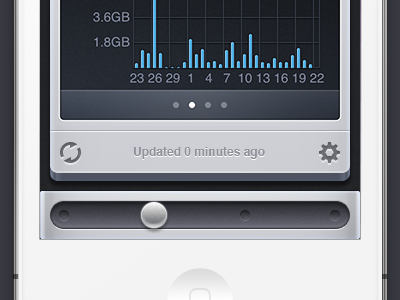
A preview of Consume 2, showing graphs and the scrubber.
Previous versions of Consume used page indicators and swiping left and right to navigate between accounts. As we added more providers, customers were able to use app for more and more things. Swiping left and right to change the view was fine for less than four accounts, but not good enough when there was more.
Our solution was to maintain the left and right swiping ability, but to replace the page indicators at the bottom of the screen with a scrubber. This has lots of advantages: You can tap anywhere along the scrubber to jump directly to an account, or you can grab the handle and slide it around to move between accounts, and see a preview while doing so.
We’ll be submitting Consume 2 to the App Store in the next few days. Consume 2 is a free update for Consume 1 owners.
Something about the size of the swipey thingy/knoby thingy and the shadow it's "casting" doesn't sit with me. Seems like the shadow is a bit too heavy making me think it's pretty high above the bar. The dimples on the far left and far right also seem too close to the left/right edges. Like, if you were to center the knob over them it would stick over the edge just a tiny bit. If you want that piece to be something that actually hangs over the edge, cool, but it doesn't make sense to me
@Crowded Road: It's not a separate app. It's just an update to the existing app. Luckily we were able to do it that way (we weren’t sure in the beginning, due to some of the changes required).
@Eduardo Santos: What don't you like about it? We actually use this glyph in all our apps. I prefer it to the way a lot of other settings cogs are drawn—ours would work in the real world (hexagon inner and outer teeth that could mesh properly with other cogs). I’m all for changing it if there’s something that needs fixing.
Like, if you were to center the knob over them it would stick over the edge just a tiny bit.
It aligns perfectly when on the far left and right positions and is centred exactly over the notch (I definitely care about details like that).
Also, the fact that the section above the "scrubber" is angled and the "scrubber" isn't angled messes with my head.
That's a fair call and we almost removed the depth effect from all the UI. Still, the scrubber's depth would just be hidden underneath the screen's bezel. Certainly possible from a real-world object point of view.
Lovely, Mark. You really managed to give Bjango apps a coherent style but without being boring or repetitive.
Some feedback:
1. The shiny metal appearance of the UI doesn't fit very weel with the opacity of the knob imho: love the noise effect but it looks a little blurry if compared to the precision of the other elements.
2. The angle of the main view doesn't feel natural if compared to the scrubber, which I feel like am looking from the top.
3. Maybe I would give the update text a slightly darker color to make it just a little bit more visible.
Pietro Desiato:
1. I agree. I've fixed the release version. The handle's edge is crisper.
2. Fair point.
3. The colour is unchanged from version 1. On the device it seems very readable. There can be a lot of data on the screen, so playing down some of the elements felt like the right choice.
20 Responses
Pro
Marc Edwards ✎ Bjango
A preview of Consume 2, showing graphs and the scrubber.
Previous versions of Consume used page indicators and swiping left and right to navigate between accounts. As we added more providers, customers were able to use app for more and more things. Swiping left and right to change the view was fine for less than four accounts, but not good enough when there was more.
Our solution was to maintain the left and right swiping ability, but to replace the page indicators at the bottom of the screen with a scrubber. This has lots of advantages: You can tap anywhere along the scrubber to jump directly to an account, or you can grab the handle and slide it around to move between accounts, and see a preview while doing so.
We’ll be submitting Consume 2 to the App Store in the next few days. Consume 2 is a free update for Consume 1 owners.
Edit: Consume 2 has been released! http://bjango.com/ios/consume/
over 1 year ago
Pro
Cory Hughes
Awesome! looking forward to it :)
over 1 year ago
Pro
Matt Kelsh
Tremendous work on the graphs. You really nailed the colours and layout there. Looking forward to the update. :)
over 1 year ago
Oh. Snap.
over 1 year ago
Pro
Callum Chapman
Looks great mate - do you develop the apps yourself?
over 1 year ago
Pro
Marc Edwards ✎ Bjango
Cory, Matt and Russ: Thanks :)
Callum: Nope, I don't write any of the code. Bjango is a few people, not just me.
over 1 year ago
Beautiful polish Marc
over 1 year ago
Pro
Crowded Road
Looks amazing... just curious how can it be a free update for v1 owners if it is a separate app?
over 1 year ago
Pro
Prakash Ghodke
looking great!!
over 1 year ago
Pro
Andrea Cau
MY GOD!
over 1 year ago
Pro
Eduardo Santos
Awesome work. Don't like the cog icon though.
over 1 year ago
Pro
Made By Thomas
sjwweeett!
over 1 year ago
Something about the size of the swipey thingy/knoby thingy and the shadow it's "casting" doesn't sit with me. Seems like the shadow is a bit too heavy making me think it's pretty high above the bar. The dimples on the far left and far right also seem too close to the left/right edges. Like, if you were to center the knob over them it would stick over the edge just a tiny bit. If you want that piece to be something that actually hangs over the edge, cool, but it doesn't make sense to me
over 1 year ago
Also, the fact that the section above the "scrubber" is angled and the "scrubber" isn't angled messes with my head. Seems to defy physics a bit…
over 1 year ago
Pro
Marc Edwards ✎ Bjango
@Crowded Road: It's not a separate app. It's just an update to the existing app. Luckily we were able to do it that way (we weren’t sure in the beginning, due to some of the changes required).
—
@Prakash Ghodke, AndyTheJoker, Made By Thomas: Thank you :)
—
@Eduardo Santos: What don't you like about it? We actually use this glyph in all our apps. I prefer it to the way a lot of other settings cogs are drawn—ours would work in the real world (hexagon inner and outer teeth that could mesh properly with other cogs). I’m all for changing it if there’s something that needs fixing.
—
@Trevor Gerzen:
It aligns perfectly when on the far left and right positions and is centred exactly over the notch (I definitely care about details like that).
That's a fair call and we almost removed the depth effect from all the UI. Still, the scrubber's depth would just be hidden underneath the screen's bezel. Certainly possible from a real-world object point of view.
Thanks for the feedback.
over 1 year ago
Love the scrubber. Actually, love it all. Very cool design solution in the scrubber/page indicator.
over 1 year ago
Great job Marc!
over 1 year ago
Pro
Pietro Desiato
Lovely, Mark. You really managed to give Bjango apps a coherent style but without being boring or repetitive.
Some feedback:
1. The shiny metal appearance of the UI doesn't fit very weel with the opacity of the knob imho: love the noise effect but it looks a little blurry if compared to the precision of the other elements.
2. The angle of the main view doesn't feel natural if compared to the scrubber, which I feel like am looking from the top.
3. Maybe I would give the update text a slightly darker color to make it just a little bit more visible.
over 1 year ago
Pro
Marc Edwards ✎ Bjango
Jonathan Lochhead, Jeremy Olson: Cheers :)
Pietro Desiato:
1. I agree. I've fixed the release version. The handle's edge is crisper.
2. Fair point.
3. The colour is unchanged from version 1. On the device it seems very readable. There can be a lot of data on the screen, so playing down some of the elements felt like the right choice.
over 1 year ago
Pro
Vilen
I really like the "refresh" icon. The rest of the UI looks awesome too!
over 1 year ago