LittleIpsum Selection Menu

7 Responses

  1. Dustin Senos Dustin Senos

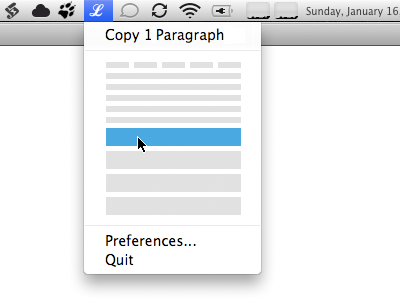
    Proposing another interaction for the upcoming UI change to LittleIpsum.

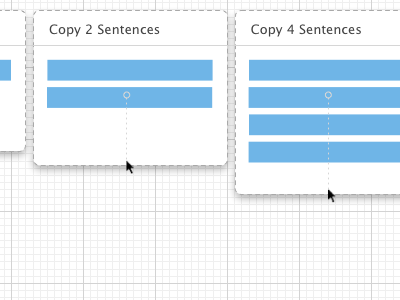
    As you move your mouse downwards from the top menu the window expands and increases the amount of Latin generated upon click.

    Coloured blocks represent words, then sentences, then paragraphs.

    The light grey line represents the total distance the mouse would have to move to go from generating one word, to four paragraphs.

    This mock up skips stages (3 words, 3 sentences, 3 paragraphs) for illustrative purposes.

    Full Version: http://dl.dropbox.com/u/403968/ui_v1_littleipsum.png
    over 2 years ago

  2. Pro Faruk Ateş Faruk Ateş

    Could be just me, but I don’t find this very intuitive. Again, the measure is completely invisible, forcing manual exploration just to determine how it works. The interaction might be easier, though.

    Changing my slider to a vertical one would combine this easier interaction, but still retain the visual measure. I can mock it up if you’d like.

    over 2 years ago

  3. Dustin Senos Dustin Senos

    Since LittleIpsum's usage is incredibly repetitive, and the target audience is arguably comfortable with computers, I'd rate speed and ease of use over upfront intuitiveness.

    That being said, the fact that you don't know where to put your mouse to get "7 paragraphs" is definitely a limitation of this approach.

    over 2 years ago

  4. Marko Prljic Marko Prljic

    Yes, this is something I was also thinking about. Is 5 words, 5 sentences and so on a strict limitation? Could you make it 10? Just curious.

    over 2 years ago

  5. Pro Grant Hutchinson Grant Hutchinson

    This is one of those interactions that you need to prototype in order to grasp whether it’s intuitive or not. In my head, I can see this working extremely well … but of course, that’s the problem … it’s all in my head.

    likes

    over 2 years ago

  6. Matthew Walton Matthew Walton

    Like Grant, I can imagine this working well, but it is hard to tell.

    over 2 years ago

  7. The main things this has going for it is that it is simple and that it has a large target.

    Increasing amount of text whilst selecting further down mirrors selecting text on a page.

    Right-click would show a standard menu with the “Preferences” and “Quit” options. To copy as HTML one could alt-click or right-click on this pop-over.

    over 2 years ago

keyboard shortcuts: previous shot next shot L or F like