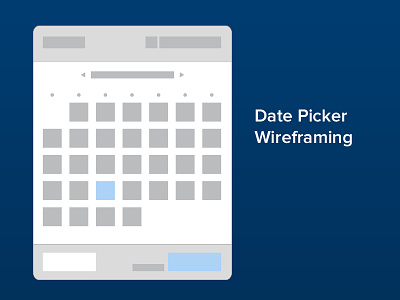
Nice one! My only argument would be to switch the colors of selected/hover... right now the hover gets more attention than the actual selected state, which in my opinion is more important. Also the shadow on the button makes it feel very floaty, as if it's detached from everything...
Oh, and the borders on the selected/current/hover make them very blurry... I'd rather have no borders and solid color. Actually now that I'm looking at things, it seems you have blurry shapes everywhere… if you're on PS, you should turn the "Snap to pixel grid" feature on from preferences - no more blurry shapes.
@Ragnar Võrel great feedback Ragnar. I have been using snap to pixel feature more and more now that I have been seeing that since I got my Retina MBP. Also good call on swapping the hover and selected colors. Always good to have second pair of eyes. Thanks again.
2 Responses
Pro
Ragnar Võrel
Nice one! My only argument would be to switch the colors of selected/hover... right now the hover gets more attention than the actual selected state, which in my opinion is more important. Also the shadow on the button makes it feel very floaty, as if it's detached from everything...
Oh, and the borders on the selected/current/hover make them very blurry... I'd rather have no borders and solid color. Actually now that I'm looking at things, it seems you have blurry shapes everywhere… if you're on PS, you should turn the "Snap to pixel grid" feature on from preferences - no more blurry shapes.
about 1 month ago
Pro
Prerak Patel
@Ragnar Võrel great feedback Ragnar. I have been using snap to pixel feature more and more now that I have been seeing that since I got my Retina MBP. Also good call on swapping the hover and selected colors. Always good to have second pair of eyes. Thanks again.
about 1 month ago