Data Control

14 Responses

  1. Pro Rovane Durso Rovane Durso

    see it @2x!

    2 months ago

  2. Pro Dominik Martin Dominik Martin

    The colors are just stunning!
    Love the flat UI!

    likes

    2 months ago

  3. Pro Whitescape Whitescape

    Looks very good!

    likes

    2 months ago

  4. Pro Tomas Jerabek Tomas Jerabek

    Wow! Awesome!

    likes

    2 months ago

  5. Pro Natko Hasić Natko Hasić

    Maybe needs a bit of contrast but still...awesome work as usual.

    likes

    2 months ago

  6. C. March C. March

    Lovely widget!

    likes

    2 months ago

  7. Pro eyal zuri eyal zuri

    Nice work

    likes

    2 months ago

  8. Pro Kelsey Whelan Kelsey Whelan

    your work is amazing!

    likes

    2 months ago

  9. Pro George Kvasnikov George Kvasnikov

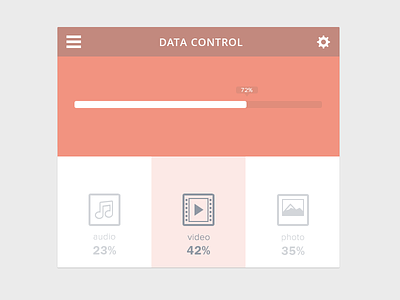
    as for me, the progress bar is a little bit too small. however, definitely deserved a like! ;-)

    likes

    2 months ago

  10. Pro Pierre Borodin Pierre Borodin

    x2 version is awesome :) love the colors.

    likes

    2 months ago

  11. Christopher Denais Christopher Denais

    One of the best flats I've seen!

    likes

    2 months ago

  12. David McGillivray David McGillivray

    Love the style of this!

    But I must say the size and spacing of the major components seems a bit awkward to me. The progress bar/percentage indicator/containing box - all seem to have a unflattering relationship to each other which leaves awkward spaces and an uneasy feel to the whole arrangement.

    The media types and their associated percentages seem to sit way too low in that bottom section - presuming the percentage is persistant and not just on mouseover, as all three are displayed at once above?

    The size of 'Data Control' feels rather arbitrary, I feel like you could finesse a nicer relationship between it and the icons either side by tweaking the size/tracking/kerning/weight, but it's nto that bad, just lacks a bit of contrast.

    It's also not clear, in this static context at least, what that top percentage bar relates to. The bottom media that appears to be highlighted/active displays a different percentage. I presume in the full flow of the interaction the context would be made clear, but as a stand alone screen, it's not obvious. Furthermore, if the top percentage indicator (I presume the amount of data storage you've used) is selectable using the 'media' buttons below it, then that relationship is not particularly clear - the hierarchy of the information seems slightly out of sync. It also seems that the media buttons are effectively just that, buttons to bring up further information, but if all I'm getting is that percentage bar visual then there's no actual value derived from clicking that button at all, as I can already see the percentage in the label, making the top percentage bar redundant, again, unless it is meant to represent something else, in which case some sort of label would be helpful. (hard to tell with a static comp if that is the case, but would love a bit of context for this UI)

    likes

    2 months ago

  13. Xalion™ Xalion™

    A bit less saturated for me but awesome work nonetheless !

    likes

    2 months ago

  14. Pro Lorenz Vercauteren-Seghers Lorenz Vercauteren-Seghers

    Nice! I would increase the size of the '72%' although I'm not sure whether the shot is at a 100% view.

    likes

    2 months ago

keyboard shortcuts: previous shot next shot L or F like