iPhone / Web UI Coming

1 Attachment

14 Responses

  1. Pro Mike Busby Mike Busby

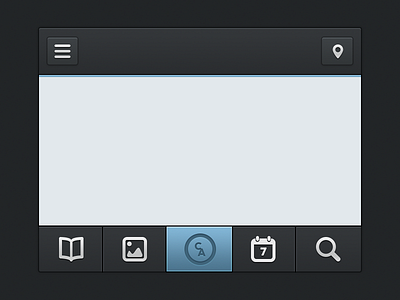
    Working on a web UI actually, removed the logo for now.

    Would love some feed back actually. Haven't done something like this in a while :)

    Make sure you check the @2x version

    likes

    3 months ago

  2. Pro Michael B. Michael B.

    NIce! Just posted something like this myself. I like your top nav buttons they have nice depth!

    likes

    3 months ago

  3. Pro Mike Busby Mike Busby

    Thanks man, yours looks great :)

    3 months ago

  4. Pro Pavel Kiselev Pavel Kiselev

    Sweet ;) Nice icons, real pixel perfect

    likes

    3 months ago

  5. Pro Greg Dlubacz Greg Dlubacz

    Nice

    likes

    3 months ago

  6. Pro Morgana D'Almeida Morgana D'Almeida

    This is very balanced right now, as soon as you post the evolution of that I think there could be more things to critique. The depth, icons, alignments, there nothing to say I guess :) it is perfect.

    likes

    3 months ago

  7. Pro Nathan Powell Nathan Powell

    Really nice @Mike Busby

    is there more of a gradient "sheen" on the top two icons than on the bottom ones?

    likes

    3 months ago

  8. Pro JAWA₯ JAWA₯

    great shot

    likes

    3 months ago

  9. Pro John Howard John Howard

    This looks amazing.

    likes

    3 months ago

  10. Pro Mike Busby Mike Busby

    Thanks everyone :)

    @Nathan Powell they should be the same I copied the same layer style

    3 months ago

  11. Pro Nathan Powell Nathan Powell

    Must be my eyes. I look forward to seeing more of this @Mike Busby

    likes

    3 months ago

  12. Jona Jona

    Beautiful work! I think the top bevels on those navbar buttons are perhaps a slight bit too opaque, but that's likely just a matter of opinion.

    likes

    3 months ago

  13. Pro Tobia Crivellari  Tobia Crivellari 

    Nice & Clean! ;-)

    likes

    3 months ago

  14. Pro Martin Saavedra Martin Saavedra

    Nice details, great work.

    likes

    3 months ago

keyboard shortcuts: previous shot next shot L or F like