Filibaba Meals Settings

1 Attachment

14 Responses

  1. Pro Max Rudberg Max Rudberg

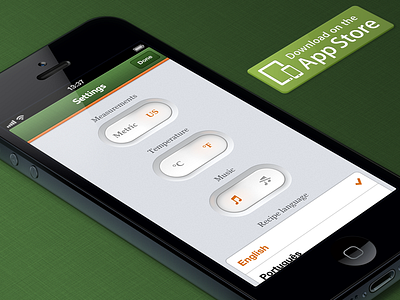
    The setting toggles you liked so much from the first release are still around.

    On the iPhone app they're access by tapping the settings cog from the main screen, which results in the app being flipped around. Special care was taken to make sure something peek into the screen on both 4" and 3.5" formats.

    Learn more on www.filibaba.com, or go download Filibaba Meals directly from the App Store:
    https://itunes.apple.com/app/veggie-meals/id495582698

    3 months ago

  2. Pro Bruno Felicio Bruno Felicio

    It looks really good.

    3 months ago

  3. Harshil Acharya Harshil Acharya

    Looks very clean !

    3 months ago

  4. Pro Ivo Ruijters Ivo Ruijters

    They look amazing, but the toggles take up a huge amount of space, forcing people to swipe a lot. I would make them smaller to get a better user experience

    3 months ago

  5. Pro iffi iffi

    Cool!

    3 months ago

  6. Pro Stanislav Hristov Stanislav Hristov

    Nice one, man!!
    looking forward to seeing more of your work.

    3 months ago

  7. Pro Max Rudberg Max Rudberg

    @Ivo Ruijters "Swipe a lot" is an exaggeration since we only have 3 languages to choose from, the screen only one cell not in view. On iPad they fit within the screen, even in landscape. But yes, smaller toggles would allow for more stuff on screen. That's always the trade off.

    @Nigel Evans Not sure I understand what you mean.

    3 months ago

  8. Pro Nuruzzaman Sheikh Nuruzzaman Sheikh

    Amazing work! Love it!

    3 months ago

  9. Pro Steve Grenier Steve Grenier

    Aw, Max. That checkmark is a few pixels to high! :D

    Looks nice though man. Always loved those toggles.

    3 months ago

  10. Jona Jona

    Amazing work, gotta love those subtle orange reflections on the toggles' edges!

    3 months ago

  11. Pro Pieter Goris Pieter Goris

    The sweetest switches I have ever seen.

    3 months ago

  12. Pro JAWA₯ JAWA₯

    coool

    3 months ago

  13. Pro Nigel Evans Nigel Evans

    @Max ignore my prior statement, I should have first viewed the real pixels, before commenting, it looks great :)

    3 months ago

  14. Pro Max Rudberg Max Rudberg

    @Steve Grenier Thanks for the catch, will fix that!

    @Nigel Evans OK, happy to hear it :)

    3 months ago

keyboard shortcuts: previous shot next shot L or F like