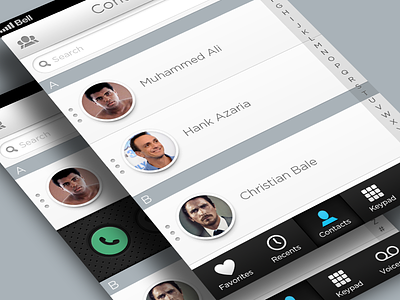
I'm learning After Effects and wanted to animate something cool so I began redesigning Apple's phone UI. I will be creating most screens that can be found within it, keeping the UX essentially the same but also adding features that may improve the experience.
VIEW THE ATTACHMENT for real pixels.
Most icons were created by Matt Gentile.
I'll probably upload each screen as I complete them and eventually animate the entire application. Feedback is welcome!
Looks great so far (specially the contact guys haha). In my opinion the sharp edges of the shoulder the people icons (like the contact and this "group" on the top left) are not fitting when compare it to the other elements like the keypad icon, voice or the fact everything is rounded. But this matte look is so much better, the concept is very nice. VERY.
Thanks for your feedback @Morgana DAlmeida . I totally agree about the sharp edges on the contact icons. In the end, this exercise is about animating the UI and these icons were free and do the trick for all intents and purposes :). If this were a real project, I would spend the time designing an icon set to fit the look. You are right though and it will probably start to drive me crazy and I'll update those contact icons :P
Haha! I know the feeling - these little things get me crazy too :P
I was talking here to a friend about this shot (@Hannes Egler - you can follow him on twitter/dribbble :) ) and what he said was: how often are you "loving" a contact or for that matter deleting too. Maybe instead of loving, the text message, and instead of delete "add to favorites", the delete could be inside edit, as this is a very permanent action. Tell me what do you think! :)
Oh yes! I think we missed the loving=favorite, you're right, my bad. And the message, yes :) I agree!
Now I'm am curious to see the animations in the future :)
5 Responses
Pro
Matt Emond
I'm learning After Effects and wanted to animate something cool so I began redesigning Apple's phone UI. I will be creating most screens that can be found within it, keeping the UX essentially the same but also adding features that may improve the experience.
VIEW THE ATTACHMENT for real pixels.
Most icons were created by Matt Gentile.
I'll probably upload each screen as I complete them and eventually animate the entire application. Feedback is welcome!
3 months ago
Pro
Morgana D'Almeida
Looks great so far (specially the contact guys haha). In my opinion the sharp edges of the shoulder the people icons (like the contact and this "group" on the top left) are not fitting when compare it to the other elements like the keypad icon, voice or the fact everything is rounded. But this matte look is so much better, the concept is very nice. VERY.
3 months ago
Pro
Matt Emond
Thanks for your feedback @Morgana DAlmeida . I totally agree about the sharp edges on the contact icons. In the end, this exercise is about animating the UI and these icons were free and do the trick for all intents and purposes :). If this were a real project, I would spend the time designing an icon set to fit the look. You are right though and it will probably start to drive me crazy and I'll update those contact icons :P
3 months ago
Pro
Morgana D'Almeida
Haha! I know the feeling - these little things get me crazy too :P
I was talking here to a friend about this shot (@Hannes Egler - you can follow him on twitter/dribbble :) ) and what he said was: how often are you "loving" a contact or for that matter deleting too. Maybe instead of loving, the text message, and instead of delete "add to favorites", the delete could be inside edit, as this is a very permanent action. Tell me what do you think! :)
3 months ago
Pro
Morgana D'Almeida
Oh yes! I think we missed the loving=favorite, you're right, my bad. And the message, yes :) I agree!
Now I'm am curious to see the animations in the future :)
3 months ago