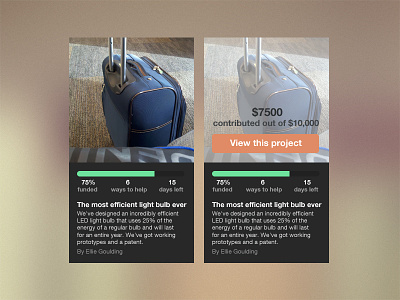
Hey Rebecca, thought this project was interesting and sucks you didn't get much feedback so I did a rebound :). In this redesign I wanted to leverage the power of the progress bar more as well as quick access to what projects are about. I felt the picture will draw people in as well as projects nearing completion. The person who created the project isn't as important as the rest so I put it at the bottom.
On hover I created a call to action. There are a few things I feel could be improved about this. The call to action should be visible without hover, however its hard to work with the spacing. Having it at the bottom of the entire card probably isn't too bad. Doing cards this way takes up more space but presents the user with 3 options while browsing the list of projects. Less choice definitely helps. Lastly, on hover, the 6 ways you can help should show. If I am a teacher or industry expert at something, a position might catch my eye, therefore getting me to click and show more interest in the project.
Would love to discuss more on if you felt this matched the style of what you were going for and if it further solved the goals of this page. Feedback welcome :)
I like where this is going. It's clean and functional.
Some thoughts:
- The background give little contrast to the UI.
- More line-height overall on the text?
- Orange button doesn't stand out enough, even if it's flat, it could contrast more.
Wow thanks for the feedback @Meng. Totally agree with the line-height now that I look at it, will pay closer attention to how I do paragraph text next time.
Could have chosen a better stock bg :)
Also agree that the orange could use a stronger color.
Will be sure to think about this when discussing the project in more detail with @Rebecca
5 Responses
Pro
Joe Anderson
View @2x!
Hey Rebecca, thought this project was interesting and sucks you didn't get much feedback so I did a rebound :). In this redesign I wanted to leverage the power of the progress bar more as well as quick access to what projects are about. I felt the picture will draw people in as well as projects nearing completion. The person who created the project isn't as important as the rest so I put it at the bottom.
On hover I created a call to action. There are a few things I feel could be improved about this. The call to action should be visible without hover, however its hard to work with the spacing. Having it at the bottom of the entire card probably isn't too bad. Doing cards this way takes up more space but presents the user with 3 options while browsing the list of projects. Less choice definitely helps. Lastly, on hover, the 6 ways you can help should show. If I am a teacher or industry expert at something, a position might catch my eye, therefore getting me to click and show more interest in the project.
Would love to discuss more on if you felt this matched the style of what you were going for and if it further solved the goals of this page. Feedback welcome :)
4 months ago
This is wonderful, Joe. I'd love to discuss further. Thank you so much. I ping'd you on Twitter.
4 months ago
Pro
Meng To
I like where this is going. It's clean and functional.
Some thoughts:
- The background give little contrast to the UI.
- More line-height overall on the text?
- Orange button doesn't stand out enough, even if it's flat, it could contrast more.
3 months ago
Pro
Joe Anderson
Wow thanks for the feedback @Meng. Totally agree with the line-height now that I look at it, will pay closer attention to how I do paragraph text next time.
Could have chosen a better stock bg :)
Also agree that the orange could use a stronger color.
Will be sure to think about this when discussing the project in more detail with @Rebecca
3 months ago
Pro
Eduardo Araya
nice work
3 months ago