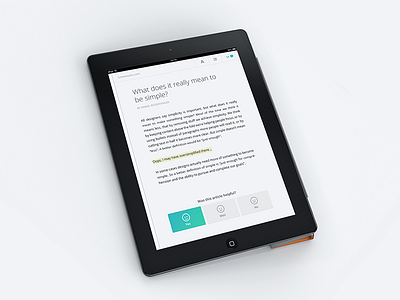
Working on the gibbon article detail screen. At the bottom of every article we will ask the user/reader if it was helpful... but not so sure if this works. What do you think?
I'd ditch the traditional buttons and design a gesture instead. Simple interactions like these are ideal to innovate with and give an app a unique personality.
I was thinking about the "A" that I guess is for increasing/decreasing type. I would just suggest using a settings icon or something. I don't even know if it fits at all, I just thought I'd throw it out there for you. Do with it what you want! :-)
I agree with @Patrick van Marsbergen on switching the share and comments.
Perhaps you could try to use a slightly different version of the share icon. This one looks a little, fat.
16 Responses
Pro
Wouter de Bres
Working on the gibbon article detail screen. At the bottom of every article we will ask the user/reader if it was helpful... but not so sure if this works. What do you think?
More info about the gibbon concept: gibbon.co
I do tweet.

4 months ago
Pro
Johan Geijer
Nice! I would loose the stripe-pattern on the buttons, other than that this is super.
4 months ago
Pro
Max Steenbergen
I'd ditch the traditional buttons and design a gesture instead. Simple interactions like these are ideal to innovate with and give an app a unique personality.
4 months ago
Pro
Oneeyedman
I like these buttons, perhaps both gestures and buttons can coexist... (I am not much into gestures)
4 months ago
Pro
Joel Helin
I was thinking about the "A" that I guess is for increasing/decreasing type. I would just suggest using a settings icon or something. I don't even know if it fits at all, I just thought I'd throw it out there for you. Do with it what you want! :-)
4 months ago
Pro
Patrick van Marsbergen
@Max Steenbergen, I'm not sure if gestures for the ranking like this is a good addition though..
The A, could maybe use a little + on the top right of the A and a little - on the bottom left..
Oh and def switch the share and comments ;)
4 months ago
Haha, "meh".
I agree with @Patrick van Marsbergen on switching the share and comments.
Perhaps you could try to use a slightly different version of the share icon. This one looks a little, fat.
4 months ago
A slider could be cool too, from 10 to 1 changing colors based on the score. I think you can do something really delightful with that.
4 months ago
Pro
Ted Goas
Soooo readable... I'd say you nailed priority number 1 on this screen.
4 months ago
Pro
Jérôme Montagne
Nice buttons, think this works like this.
4 months ago
Beautiful design on the real pixel shot (Y)!
4 months ago
Pro
Eric Kidd
Maybe have just one face and a slide bar. Slide it to the left, face gets sad, slide to the right, face gets happy?
4 months ago
Pro
Bart Ebbekink
Cute!
4 months ago
Pro
Arron J. Hunt
Why is the smart cover on the wrong side?
Looks good though.
4 months ago
I loooove simple & bold designs :)
4 months ago
Pro
Rob Smittenaar
clean.. solid & uniform.. like !!
3 months ago