The other day I downloaded Highlight. It is a great concept, but I feel the current UI is very data driven with a lot of meta data visible at all times. It also lacks a brand personality, which sucks, because there is so much you can do with their branding.
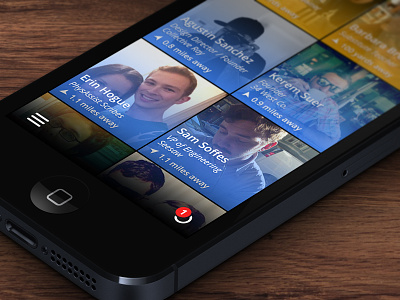
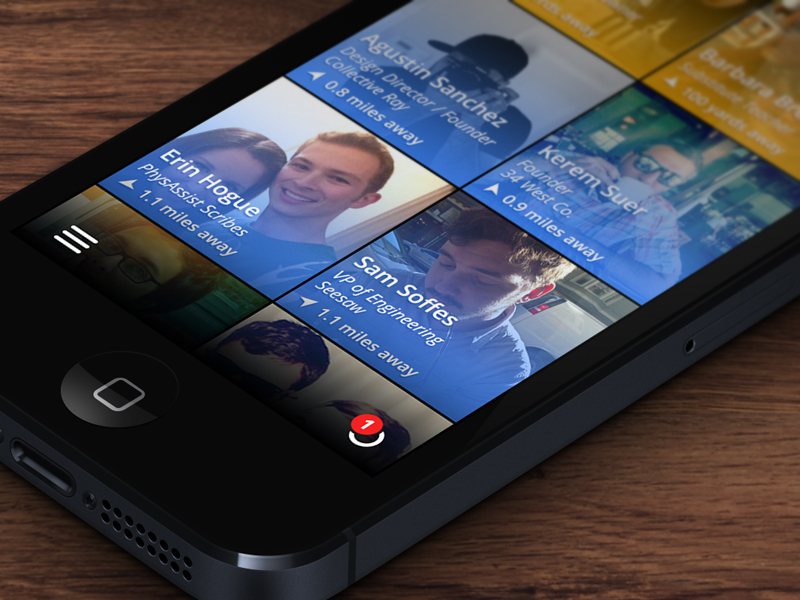
In my example, I wanted to re-create the main screen. This is the screen where you see who is near you. I wanted to remove all information that isn't needed on this initial screen. Diving into a profile will give more meta data on that person. I also put the UI elements at the bottom so you didn't have to cross the whole device just to open the menu.
Blue people are just people around you that Highlight thinks you should know, yellow are people you have already highlighted.
This was just a fun exercise for me so feel free to let me know what you think!
Really great UI.
Like the color gradient overlay.
Maybe I'll borrow some little things for phonetrait ;)
However I would decrease the size of the squares so that 3 fit in one row to be able to show more people on screen.
@PaulStudies say that when users are presented with a choice 6-12 options are ideal. Much more than that and the user tends to feel overwhelmed, much less and it's not engaging enough.
In my feedback email to highlight requesting login options beyond Faceballs, I also told them they should hire you to redesign the app & linked to this shot ;). Nice work.
Looking good Jeff, love the notification icon on the bottom BUT .. I think the gradient is way to long.. your missing the real colors and even removed the face of your girlfriend :-).
Awesome @Jeff Broderick!
What about decreasing the size / height of the blue glow, to be able to more clearly view the people you want to highlight. Then, when you highlight them, the height is increased to the current yellow state in your attached.
14 Responses
Pro
Jeff Broderick
The other day I downloaded Highlight. It is a great concept, but I feel the current UI is very data driven with a lot of meta data visible at all times. It also lacks a brand personality, which sucks, because there is so much you can do with their branding.
In my example, I wanted to re-create the main screen. This is the screen where you see who is near you. I wanted to remove all information that isn't needed on this initial screen. Diving into a profile will give more meta data on that person. I also put the UI elements at the bottom so you didn't have to cross the whole device just to open the menu.
Blue people are just people around you that Highlight thinks you should know, yellow are people you have already highlighted.
This was just a fun exercise for me so feel free to let me know what you think!
Check out the @2x & real pixels.
4 months ago
Pro
Jesse Penico
Definitely like this better than the Android app, for sure. Nice work!
4 months ago
Good luck fitting my name. Also, the colors are a bit harsh.
4 months ago
Really great UI.
Like the color gradient overlay.
Maybe I'll borrow some little things for phonetrait ;)
However I would decrease the size of the squares so that 3 fit in one row to be able to show more people on screen.
4 months ago
Pro
Jeff Broderick
@Paul Studies say that when users are presented with a choice 6-12 options are ideal. Much more than that and the user tends to feel overwhelmed, much less and it's not engaging enough.
4 months ago
Pro
Oykun
oh my! Don't you just look like Patrick Swayze here?! :)
btw, love the design, overlay colours could be shorter and more subtle maybe though.
4 months ago
Pro
Josh Holloran
In my feedback email to highlight requesting login options beyond Faceballs, I also told them they should hire you to redesign the app & linked to this shot ;). Nice work.
4 months ago
Pro
Arian Behzadi
I absolutely love the idea of purposing the readability gradient (normally black) as a colored indicator of more info! I'm gonna steal it :)
4 months ago
Pro
Christophe Tauziet
SO MUCH BETTER. I also like their concept, but the UI looks terrible. Way too complex. Great work.
4 months ago
Pro
Gordon Clines
Nice! I totally spotted myself too!
I love that you share your thought process, it's very enlightening.
4 months ago
Pro
Jeff King
Love the gradient non-tab bar tab bar approach @Jeff Broderick
Refreshing
4 months ago
Pro
Dreamix Studio
Looking good Jeff, love the notification icon on the bottom BUT .. I think the gradient is way to long.. your missing the real colors and even removed the face of your girlfriend :-).
4 months ago
Cool! Would be tempted to increase the size of the gradient behind the nav bar slightly
4 months ago
Awesome @Jeff Broderick!
What about decreasing the size / height of the blue glow, to be able to more clearly view the people you want to highlight. Then, when you highlight them, the height is increased to the current yellow state in your attached.
4 months ago