Icon

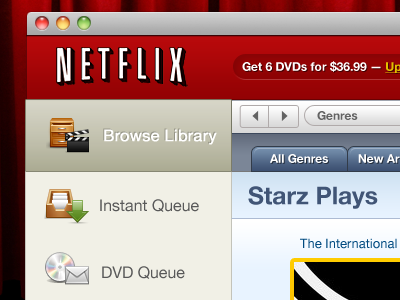
Netflix for Mac

Shot_1291434594

6 Responses

  1. Icon New Leaders

    I came up with a concept on how the experience could be more friendly than just their website. Using their API and my team I can build this app but I would need their assistance and permission for deeper integration.

    I posted my question to Quora hoping to find help. If you know how we can get permission to build a true iTunes like Mac client please let me know.

    http://bit.ly/Netflix-for-Mac

    over 1 year ago

  2. Pro 483365_10150687556574769_500899768_8788991_1933571927_n Zach Inglis

    I like this. Not a huge keen on the active gradient and think maybe you can make All Genres tabs full height.

    Good luck!

    likes

    over 1 year ago

  3. Icon New Leaders

    Yeah, maybe in the final version we can make it more like a modern Mac apps in Lion than in Leopard. Sort of "Skate to where the puck will be".

    over 1 year ago

  4. Icon

    • 7
    • 4
    • 1,275

    over 1 year ago

  5. Pro Logo Casey Britt

    Seems a little busy from a UX perspective. Also Personally I could see a flatter approach to UI being more inline with the Netflix brand. I'd also be curious to hear what you think would be the benefits of this native app over the website.

    likes

    over 1 year ago

  6. Icon New Leaders

    That is probably fair. It was an attempt to cross breed the Netflix website with an iTunes like library management application. I don't know about you but I find the NetFlix website to be a little confusing and I wondered what managing my queue like iTunes would be like. Whenever I had to visit the NetFlix website I always like this should be an app that I launch from my dock. Benefits of a native app could include more responsive UI, no page loads, core animation, spotlight integration, playlists, smart playlist, better queue management, better browsing, social networking integration and so on... You could certainly do this with a web app as well but a native desktop app provide even more richness.

    over 1 year ago

keyboard shortcuts: previous shot next shot L or F like