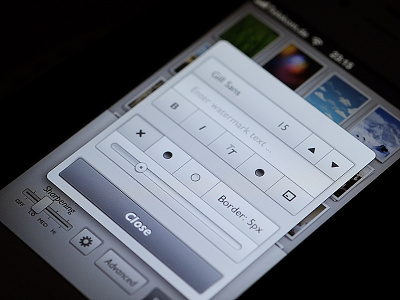
Awesome, really love your style Tobias. I'm not sure about the italicised text though. It works okay on the Start! button, but elsewhere, especially on the Close button, it feels slightly awkward.
I mostly made it for myself, as I missed an iOS app that can resize images not only to a given pixel size, but also to a given file size limit ( and auto-determinates the needed jpeg compression).
This is often needed to upload to web-services/communities that restrict the max. file size.
And when I'm traveling my iPad is my only "computer" around to do that.
Edit: Oh, and you can remove the exif data, which might be useful for iPhone photos to hide the gps data.
I also added an option to re-sharpen the image after the resize, and the possibility to add a watermark/description text or a simple border.
So this is kind of a "Web Optimizer" app, that does the stuff I usually do in the Adobe Lightroom Export dialog.
I also attached full screenshot for iPhone Retina and iPad.
After submitting an bugfix-update for Reduce today, I started working on some new features for an upcoming Version.
When batch-resizing pictures you will then be able to choose from 4 different settings for the export:
- fixed longer edge
- fixed shorter edge
- fixed width
- fixes height
I don't think you need a special camera for this,
as the DOF gets really tiny on this distance.
The camera was a Fuji X-Pro1 with the 60mm 2.4 lens.
I didn't keep the picture, but I think it was about aperture 5.6 to 8, so a point and shoot cam with a macro mode could have done the same I guess...
15 Responses
A new project I'm currently working on.
7 months ago
Love it!!! Unique style as always :]
7 months ago
Nice Work!
7 months ago
Woah. This is so good!
7 months ago
Thanks. :)
Added a real screenshot to the attachments now...
7 months ago
Awesome, really love your style Tobias. I'm not sure about the italicised text though. It works okay on the Start! button, but elsewhere, especially on the Close button, it feels slightly awkward.
6 months ago
Love it!
6 months ago
I really like, but I have to agree with @Robbie Pearce. The font doesn't really fit the overall design.
6 months ago
Clean and functional.
6 months ago
Might give a version with the system font a try.
Thank you all for the feedback and spending that shot some love. :)
6 months ago
Yes!
6 months ago
Rebound
Mainscreen
by Tobias Wiedenmann
Another screen of my upcoming app "Reduce".
I mostly made it for myself, as I missed an iOS app that can resize images not only to a given pixel size, but also to a given file size limit ( and auto-determinates the needed jpeg compression).
This is often needed to upload to web-services/communities that restrict the max. file size.
And when I'm traveling my iPad is my only "computer" around to do that.
Edit: Oh, and you can remove the exif data, which might be useful for iPhone photos to hide the gps data.
I also added an option to re-sharpen the image after the resize, and the possibility to add a watermark/description text or a simple border.
So this is kind of a "Web Optimizer" app, that does the stuff I usually do in the Adobe Lightroom Export dialog.
I also attached full screenshot for iPhone Retina and iPad.
6 months ago
Rebound
Reduce - Resize Mode
by Tobias Wiedenmann
After submitting an bugfix-update for Reduce today, I started working on some new features for an upcoming Version.
When batch-resizing pictures you will then be able to choose from 4 different settings for the export:
- fixed longer edge
- fixed shorter edge
- fixed width
- fixes height
6 months ago
I love it a lot, what camera did you use to take this shot ?
5 months ago
Thanks a lot. :)
I don't think you need a special camera for this,
as the DOF gets really tiny on this distance.
The camera was a Fuji X-Pro1 with the 60mm 2.4 lens.
I didn't keep the picture, but I think it was about aperture 5.6 to 8, so a point and shoot cam with a macro mode could have done the same I guess...
5 months ago