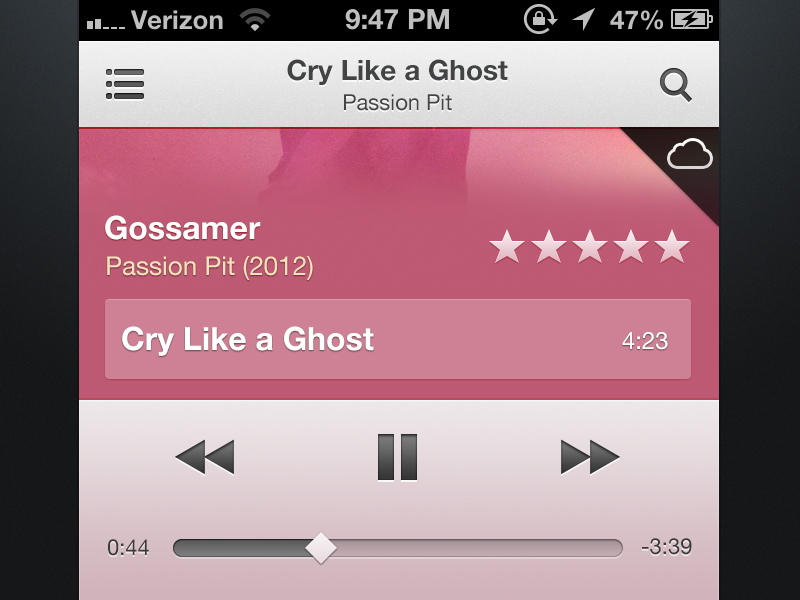
I had some free time today, so I decided to throw together what I think the Music.app on iOS would look like if it matched the new iTunes 11 interface.
The album art would work similar to Rdio's new iOS app, where the entire view scrolls, revealing all the songs on the album.
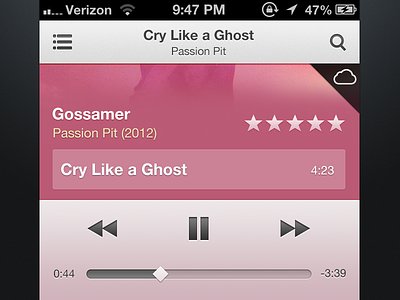
Check out the @2x image for a clearer shot and the attachment for the full view.
While I think it's interesting, you can't overlook that there is repeated information like track name and artist name, and it's missing volume controls.
@Matt Zanchelli Thanks, but iTunes 11 repeats track and artist name too. Based on the way I'm including the album tracks in the same view, it just so happens you may see repeated information based on which song is at the top of the list.
Also, a volume rocker, in my opinion, takes up too much space when you already have dedicated volume rockers on your phone.
@Christian Dalonzo right, but this is a mobile device and due to the smaller screen size, the issue is compounded. I'm sure there's some other way of organizing this that'll fix it. :D
Since I saw iTunes 11 I wanted to make an iPhone version. Before I publish my shot I checked if someone else already have this idea, so it seems right to me to rebound that shot :) Btw as you can see this is the Album view, I really love how they manage it on iTunes for mac, it brings me back at the time when I used Compact Disk and on the back cover there were all the songs in the album. If this was the effect apple was searching for, well they nailed it. The progress bar change the color based on the cover album as the fonts do on the mac. Instead when a a song meet the album cover it gently fade and you can scroll for other title if there are. Watch the real pixel (iPhone 5) it worth it Hope you like it :)
7 Responses
Pro
Christian Dalonzo
I had some free time today, so I decided to throw together what I think the Music.app on iOS would look like if it matched the new iTunes 11 interface.
The album art would work similar to Rdio's new iOS app, where the entire view scrolls, revealing all the songs on the album.
Check out the @2x image for a clearer shot and the attachment for the full view.
6 months ago
Pro
CJ Melegrito
Very slick. I like this idea. You could even add interface cues that sampled colors from the current album artwork and apply it.
6 months ago
While I think it's interesting, you can't overlook that there is repeated information like track name and artist name, and it's missing volume controls.
6 months ago
Pro
Christian Dalonzo
@Matt Zanchelli Thanks, but iTunes 11 repeats track and artist name too. Based on the way I'm including the album tracks in the same view, it just so happens you may see repeated information based on which song is at the top of the list.
Also, a volume rocker, in my opinion, takes up too much space when you already have dedicated volume rockers on your phone.
6 months ago
@Christian Dalonzo right, but this is a mobile device and due to the smaller screen size, the issue is compounded. I'm sure there's some other way of organizing this that'll fix it. :D
6 months ago
Pro
Prekesh Chavda
I'd much prefer on-screen volume controls. Pressing the buttons on the device is horrible. Everything else is nice I likes it.
6 months ago
Rebound
iTunes 11 for iPhone (Album View)
by Pietro Schirano
Since I saw iTunes 11 I wanted to make an iPhone version. Before I publish my shot I checked if someone else already have this idea, so it seems right to me to rebound that shot :) Btw as you can see this is the Album view, I really love how they manage it on iTunes for mac, it brings me back at the time when I used Compact Disk and on the back cover there were all the songs in the album. If this was the effect apple was searching for, well they nailed it. The progress bar change the color based on the cover album as the fonts do on the mac. Instead when a a song meet the album cover it gently fade and you can scroll for other title if there are. Watch the real pixel (iPhone 5) it worth it
Hope you like it :)
6 months ago