Dsc_0188_4_bigger

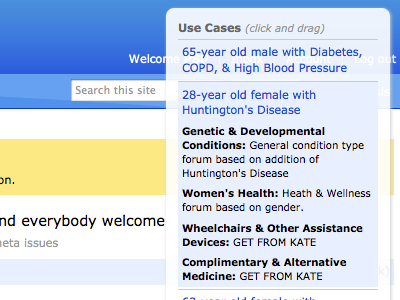
Floating use case switcher

Shot_1288805047

6 Responses

  1. Dsc_0188_4_bigger Adam Darowski

    As part of this "doing more design" thing, I've been mocking up some new features and enhancements lately. I tried doing it the way I used to — multi-layer Fireworks files. That was killing me, so off to Haml/Sass/jQuery for me.

    So, this new UI looks very different depending who's using it. So on the page, I put in a floating window where you can choose from five use cases. You click on the use case and jQuery expands a description of it and also updates the content on the main page.

    This, my friends, is why this never gets old.

    over 1 year ago

  2. Jasonrobb Jason Robb

    YES! Love this approach to prototyping, although it sounds like you're working with the native environment as your framework. Very hot. Would love to see a more detailed blog post about how you did this... or perhaps a chat over lunch?

    over 1 year ago

  3. Pro Rich_thornett_280_gray Rich Thornett

    Having a menu for use cases is fantastically useful. And not just for UIs - would have been nice to have something like this to prepare flows through the actual working application.

    Curious about the "click and drag" part - what is drag for?

    Great stuff as always, Adam, thanks for sharing.

    over 1 year ago

  4. Dsc_0188_4_bigger Adam Darowski

    @Jason - Blog post would be good... lunch would be yummier. :)

    @Rich - Thanks! The dragging part is just to move it if it gets in your way. As you can see, it's shoved on the top right now, so it's pretty much out of the way. But if you need search or logout, you can move it.

    over 1 year ago

  5. Dpie_73x73 David Piehler

    Adam, what are you using to run your mockups? I'm going to try out Serve next week for prototyping my next project. It's made by one of the Radiant devs, and seems to have all the necessities (Haml, Sass, Compass, jQuery).

    over 1 year ago

  6. Dsc_0188_4_bigger Adam Darowski

    dpie: These are new features within an existing app, so I'm doing it in a little area we've set aside for doing little projects like this (it automatically renders header, base CSS & javascript, so I'm just mocking up in the main #content area.

    over 1 year ago

keyboard shortcuts: previous shot next shot L or F like