Process Testing - Blueprints

41 Responses (page 1 of 2)

  1. Josh Hemsley Josh Hemsley

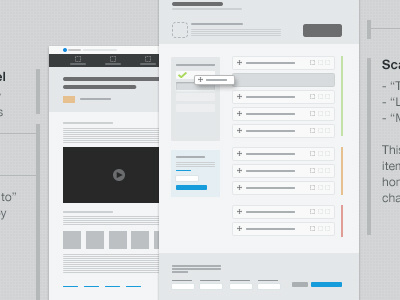
    Took a page out of Mr. Broderick's book here and put this tiny blueprint into a recent planning/scoping project for MyEnergy. We definitely found a lot of good things to take out of this. To name a few:

    a) Once you create your template, laying out ideas moves VERY quick.
    b) Having it at such a small scale your able to conceptualize the larger scope very easily.
    c) It gives ability to layout the thumbs as a flow chart + wireframes + interaction details and notes all in one process.
    d) It made engineers and sales teams stoked. Big plus :)

    This is definitely staying in our process! Hat tip, Jeff and company!

    likes

    9 months ago

  2. Alexander Scott Alexander Scott

    Mercy.

    9 months ago

  3. Jed Bridges Jed Bridges

    Looks dope homie! Are you doing this in Ai?

    likes

    9 months ago

  4. Josh Hemsley Josh Hemsley

    @Jed Bridges I'd recommend doing it in AI, but seeing as I can design a full website in photoshop faster than I can figure out how to draw a square with rounded corners in Illustrator, I do it in Photoshop :)

    I just used vector shapes, then utilized smart objects for templates. I also created a master doc style doc with a bunch of styles and assets as I built them.

    likes

    9 months ago

  5. Rob Schlegel Rob Schlegel

    Josh,
    How is this different than just creating a wireframe with pen and paper (or Balsamiq for those of us who dont like sketching)? It seems like this is achieving the same result but you're spending more time to make it look prettier. I also feel like creating wireframes devoid of any styling is more advantageous because it makes you and the client focus on solely the content and UX and not get hung up on any styling niggles or preconceived notions of what the actual designs will look like. Not trying to be a dick or anything, just genuinely curious.

    likes

    9 months ago

  6. Dustin Pace Dustin Pace

    We've actually been using keynote for wire-framing/templating through the last release. Found it to be much faster and easier...and didn't spend forever trying to remember how to round corners in Illustrator :P

    Keynote surprisingly has several really nifty shortcuts and features for fast prototyping. You should try it out!

    likes

    9 months ago

  7. Jed Bridges Jed Bridges

    Very cool. I've just been getting into dynamic art in Ai. ITS AMAZING. So if I have a button or something, the vector art will grow and adapt to the type depending on how long the word is : )

    likes

    9 months ago

  8. Jack Bingham Jack Bingham

    This looks super fun! I have to try this.

    likes

    9 months ago

  9. Josh Hemsley Josh Hemsley

    @Rob Schlegel: You're not sounding like a dick at all! I think there is definitely a place for all the above, if thats what works best. And this doesn't necessarily have to replace those options if they help the process.

    For me, I've never sketched because a) I suck at everything with a pen a paper and b) it frustrates me that I have re-sketch things when I have another idea, or make a mistake or things change. It just doesn't translate my ideas the way I process them.

    Using tools like Balsamiq is too heavily focused around content details, for us. Most of our team doesn't need to know too much about the specifics of "What will this say?" and "where will this content be?", but more of "how will it work" and "what do we need to build."

    Plus using 3rd party tools typically puts me in an unfamiliar territory and drills into too much of my time. I'm as comfortable in Photoshop as I am with putting on my pants so creating something as such is super quick. It also is too large scale that it doesn't let your understand the full scope of things, only in-page elements.

    I think I use this process a little differently this Jeff did. I don't use it as a say all for layout content. It basically a way to dip into all ends of the spectrum from a user flow to interaction details to some content structure. Our process normally starts on a white board, then jumps to google docs for more specific requirements. This is the way to mesh that process and the creative process in one.

    I also enjoy the fact that you can create master assets and templates directly relevant to your project. It makes the process go extremely fast.

    But to be honest, if you don't dig, don't do. I'm just glad Jeff didn't keep this one to himself because for me it filled a gap we didn't have in our process, due to frustrations with other solutions.

    likes

    9 months ago

  10. Rob Schlegel Rob Schlegel

    @Josh Hemsley Gotcha. I totally get where you're coming from about just using whatever tool you're most comfortable with. I can also see where this would be helpful to shrink things down and kind of take a step back and understand the full scope like you said. I'll definitely keep this in mind as an option for future projects. Thanks for sharing it!

    likes

    9 months ago

  11. Josh Hemsley Josh Hemsley

    @Dustin Pace I've used keynote for some interaction prototypes for a few projects. Definitely has great things. I think we've found that it's best utilized for us late in the planning game that it became easier/faster for us to just prototype directly in code. Like my above comment, for wireframing it was just too much of a foreign tool that it didn't save me time to push that process into it.

    9 months ago

  12. Dann Petty Dann Petty

    this looks awesome josh. looks like some info graphics i've seen around. great style.

    as much as i like this, i have to ask, how long did it take? i'm guessing not a couple mins. this is why i don't wireframe. like you, i hate drawing :) and i feel like it takes too much time to do. what i can wireframe in 10 mins i could already have placed in photoshop at actual size and really see if it's working or not with semi real content.

    most people think getting your ideas on paper first is best but i truly believe in getting it to photoshop quicker is light years better. laying out ideas at actual size with semi actual content makes you think in a whole new way than small thumbnails. but hey, that's just me! :D

    sweet.

    likes

    9 months ago

  13. Timothy Whalin Timothy Whalin

    @Josh Hemsley I think what I get from this most (and the conversation started here) is: find what works for you best and do that. But also occasionally try experimenting with new processes to see if there is something better. I loved the idea when @Jeff Broderick posted the shot and I love seeing the context of it here as well. I believe this works very nicely as a digital version (and a bit clearner) of sketching. Its also easier to move around and conceptualize big pictures (as you had mentioned) instead of 1024x768 wireframes that you could have 200+ screens to do.

    likes

    9 months ago

  14. Julien Renvoye Julien Renvoye

    @Josh Hemsley @Dann Petty I kinda agree with you Dann BUT lol I found very practical to actually layout a page by drawing it on a piece of paper to actually come up with a innovative layout or illustrations ideas rather than just doing in PS which will take me much longer. It forces me to think.

    I guess it really depends. Love those discussions :)

    likes

    9 months ago

  15. Josh Hemsley Josh Hemsley

    @Dann Petty Dude I am soooo right there with you. I've NEVER been a fan of the "in-between" process, and still am not when it comes to most client type work. The issue I ran into was we didn't have the "what needs to happen" figured out yet, and who needs to do what to make it happen.

    I wanted to jump into photoshop for this soo bad (or actually code since that's where I spend most of my time now) , but the realization was, I really didn't know where to start. Since I'm leading a LARGE portion of the initial planning for this piece, these really weren't about the "design" per se but more about figuring out what the crap is this thing going to do and how can I explain that to our entire team without going through this long drawn out process of creating designs first and everyone waiting on me to finish.

    Typically I'd separate these tasks out: do a brainstorming session, create an initial idea doc, do a flow chart, build a requirement/story doc, and then finally jump into design. But this thumbnail process excluded the need for almost all of that, plus allowed me to somewhat start my design process.

    I should note that it wasn't just these two screens. There was MUCH more created that covered a good scope of an entire feature and it's interactions.

    I think the overall benefit I am now able to tuck away and work on the actual designs, without the stress of everyone waiting on me to figure it out. Now everyone has a sense of what they are working on a what needs/will happen.

    likes

    9 months ago

  16. Josh Hemsley Josh Hemsley

    @Timothy Whalin Spot on! If you have a process that works, keep at it! If you know your process has some holes and are looking for options, here is one worth trying. No doubt there are pros & cons of all, but it's finding what works best in the balance of what you or your team needs.

    likes

    9 months ago

  17. Dick Dick

    I can see this putting more focus on workflows and flow charts. Love it solely for making it easier to view everything holistically!

    likes

    9 months ago

  18. Jared West Jared West

    I think its a great way to convey ideas across a team, in a way that is easy to understand and follow. My sketching makes sense to me but not everyone can see the same concept behind it.

    I would love to see the full view if its possible.

    likes

    9 months ago

  19. Liam McKay Liam McKay

    Absolutely love these mini-blueprints, think I might have to start doing these myself!

    9 months ago

  20. Henry Moran Henry Moran

    Wish I could see the entire mock. :/

    Great stuff though.

    9 months ago

  21. Tristan Geisbichler Tristan Geisbichler

    Maybe we see this tiny blueprints endend up in a native standalone Solution on the App Store. Would Love to see some .psd templates ;) .. I'am a big fan of this wireframes/blueprints/tiny toons

    9 months ago

  22. Kerem Suer Kerem Suer

    As you said, this filled a gap for you and your team and I think that's the most important thing on this case. I love wireframing, I love planning, I love sketching, I also love designing. Doesn't mean I can't use this. I think whatever makes your life easier and more efficient is what you're supposed to do. I for the same reason don't use Illustrator much, because I'm just not as fast. I'm pretty fast on Photoshop but one of the reasons I do sketch with pen and paper is because it eliminates distractions for me, and it ends up being faster and more focused. If I dive into Photoshop to wireframe to start with, I get stuck with colors, shapes, contrast, this, that. Sketching let's me trim all that fat and focus on one thing. But again, these are all personal selections, so thank you for sharing your process and thinking behind it.

    And one last thing, I think people need to understand, just because you're using a different method, doesn't really make your method right or all other methods wrong. There are multiple rights and almost no wrongs here. It's good to build on it, but I guess it's easier to tear it apart.

    PS: I am also going to try this to see how my client reacts to it, will share the experience.

    likes

    9 months ago

  23. Mark Popkes Mark Popkes

    Looks awesome. Personally, I find putting together wireframes in Fireworks to be extremely helpful, especially when creating shapes and changing a shape from square to rounded. :) Like you, I can't seem to focus my ideas with pen and paper. My ideas change too much on the fly and I will always need to change stuff, or move a block of content somewhere else. Great job on this! I dig!

    9 months ago

  24. Envoy Envoy

    how the heck has wireframing not been apart of the process :) - got to keep those clients in check. Indesign is the way to go (11x17 - cut down a forrest style). Looks like you are wasting too much time making those look pretty - waiting for the "is that the color you are going to use" question.

    9 months ago

  25. Ced Funches Ced Funches

    @Dann Petty @Josh Hemsley @Kerem Suer Good points. It is a matter of choice. Same argument. Different solutions. I think that I prefer to build in Photoshop because it becomes real...quicker. Nothing against sketching. Just past that point.

    Plus, I have found wireframes usually are great for me, not really my clients. They just nod and drink Starbucks like they are used to being billed to see my thoughts on paper. I usually HIFI prototype and blow expectations away. Or comp a InVision walkthrough and hand over an ipad.

    To each his own though.

    likes

    9 months ago

keyboard shortcuts: previous shot next shot L or F like