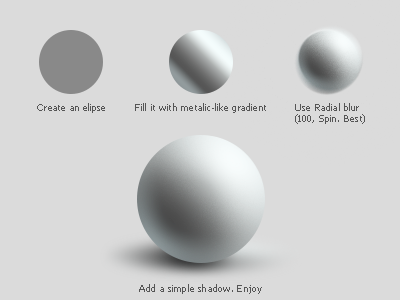
Sphere tutorial. Photoshop.

Sphere

30 Responses (page 1 of 2)

  1. Alexander Zapadenko Alexander Zapadenko

    Hello, Dribble, today came up with little tutorial for you, that i'm have invented tonight.
    I dont know, did somebody already described this method, but if not — i hope you enjoy.

    9 months ago

  2. Pro Adrien Olczak Adrien Olczak

    straight to the point tut Alex, thanks

    likes

    9 months ago

  3. Justin Garand Justin Garand

    Awesome! Love the simplicity

    likes

    9 months ago

  4. Rob Stroom Rob Stroom

    Very nice! Thanks for sharing.

    likes

    9 months ago

  5. Mylo Mylo

    very nice. thanks mate.

    likes

    9 months ago

  6. Pro Uwe Klinger Uwe Klinger

    Well done!

    likes

    9 months ago

  7. Victor Victor

    usually i am adding layer style with radial gradient and inner shadow with environment color for reflex

    likes

    9 months ago

  8. Pro Igor Garybaldi Igor Garybaldi

    — Wow!)

    likes

    9 months ago

  9. Dominique Torfs Dominique Torfs

    Holy sh*t! You make it look so easy!

    likes

    9 months ago

  10. Pro Sam Jones Sam Jones

    There needs to be more tutorials like this - simple and straight to the point. Thanks for the tip @Alexander Zapadenko

    likes

    9 months ago

  11. Pro Sam Marchant Sam Marchant

    this is very handy, thanks!

    likes

    9 months ago

  12. Pro Anton Kudin Anton Kudin

    Sphere looks nice. Shadow however needs more work. Squashed radial gradient just doesn't work.

    likes

    9 months ago

  13. Lewis Jones Lewis Jones

    Impressive, thanks

    likes

    9 months ago

  14. Pro Jeremy Elder Jeremy Elder

    The thought of a dribbbletorial is great enough, but the fact that you can do this in this few steps is fantastic. Thanks for sharing!

    likes

    9 months ago

  15. Alexander Zapadenko Alexander Zapadenko

    If i will create more four-steps tutorials i'll share them too. But something bigger is not a dribbble format, you right.

    9 months ago

  16. Wes Biffar Wes Biffar

    Brilliant.

    likes

    9 months ago

  17. Pro Waseem Arshad Waseem Arshad

    Nice, you are a teacher of the day :)

    likes

    9 months ago

  18. Pro Andrea Cau Andrea Cau

    Thanks Alex! :D

    likes

    9 months ago

  19. Pro Matthew R. Walker Matthew R. Walker

    Quick and simple. Awesome!

    likes

    9 months ago

  20. Nemanja Nenadic Nemanja Nenadic

    Awesome tip!

    likes

    9 months ago

  21. Pro Jonathan Quintin Jonathan Quintin

    Works a treat!
    Awesome!

    likes

    9 months ago

  22. Pro Prathyush Prathyush

    But would it be a vector ?

    likes

    9 months ago

  23. Pro Michal Mervart Michal Mervart

    Good simple job.

    likes

    9 months ago

  24. vijay vijay

    super simple, thanks for sharing.

    likes

    9 months ago

  25. Pro Jonathan Patterson Jonathan Patterson

    Clever

    likes

    9 months ago

keyboard shortcuts: previous shot next shot L or F like