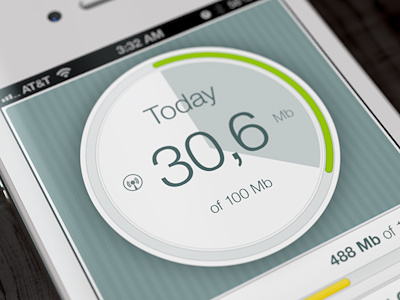
DataWiz GUI

Datawizsmall

1 Attachment

13 Responses

  1. Pro Artua Artua

    Here is some of our latest GUI projects. Its DataWiz application developed by Princeton University. Recently we posted the icon from this project. What we did was whole GUI / graphic design of the app for both iOS and Android versions.
    Please don't forget to check the attachment!
    Enjoy!

    likes

    9 months ago

  2. Pro Tobia Crivellari  Tobia Crivellari 

    Lovely UI!! Well done!! @Artua

    9 months ago

  3. Martin Schurdak Martin Schurdak

    lovely colours:)

    9 months ago

  4. Pro Yoga Perdana Yoga Perdana

    Nice Colors!

    9 months ago

  5. Pro Tanveer Junayed  Tanveer Junayed 

    Wow dude! Looks amazing!

    9 months ago

  6. Pro Tomas Bartko Tomas Bartko

    Well done, love the UI.

    9 months ago

  7. Pro Nuruzzaman Sheikh Nuruzzaman Sheikh

    amazing work!

    9 months ago

  8. Pro M khalid khan M khalid khan

    nice work

    9 months ago

  9. Pro Gabriel O'Flaherty-Chan Gabriel O'Flaherty-Chan

    Nice elements, but watch out how small you go with those font sizes (ie. the labels on the rightmost graph)

    likes

    9 months ago

  10. Pro Luboš Volkov Luboš Volkov

    looks very nice nd tidy! :)

    9 months ago

  11. Pro ModernBits ModernBits

    That looks so sexy dude, great work. The only area I am not sold on is the analytics bars. I think it clashes to much with the light design you have going on. Everything else looks amazing. :)

    likes

    9 months ago

  12. Kristof Tarisznyas Kristof Tarisznyas

    Really nice work! Clean and sexeh!
    But I agree with CreativeDraft - the analytics part looks like "inside" of the app, they have an under-the-hood feel to them. Which would look great on a "normal" app, but given the app displays usage statistics on the light screen, it makes it look a bit unconnencted

    9 months ago

  13. Howard Gonzales Howard Gonzales

    Great work! I honestly love the use of the colors. Great use of contrast. :)

    8 months ago

keyboard shortcuts: previous shot next shot L or F like