Infographic

Ss_main

18 Responses

  1. Pro John Neiner John Neiner

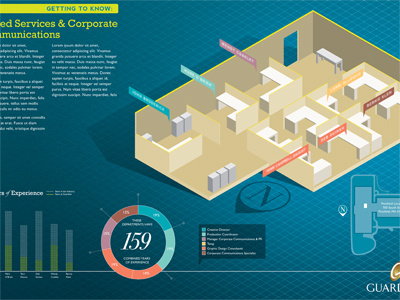
    A shot of an infographic I have been working on for a client. Aimed at showcasing years of experience and total combined years of experience of the employees within that department.

    (secret fact: the idea for the isometric graphic of the cubicles/desks came about after seeing the isometric guide lines that Kyle Jones had in one of his shots.)

    over 3 years ago

  2. Jeremy Swinnen Jeremy Swinnen

    Very nice! Subtle effects and colors

    over 3 years ago

  3. Pro Chris Wallace! Chris Wallace!

    John. That's not a secret fact. If it were, you wouldn't have shared it with anyone. Now it's a public fact. :P

    over 3 years ago

  4. Pro John Neiner John Neiner

    @Chris, I'm pretty sure it still is a secret fact . . . because I used parentheses! :P

    likes

    over 3 years ago

  5. Pro Tyler Thompson Tyler Thompson

    I keep thinking that the desk should be casting a shadow too? Great work so far.

    over 3 years ago

  6. Pro John Neiner John Neiner

    @Tyler, totally. Therein lies the flaw with the design. We worked out the math for the isometrics and saved them as actions in illustrator to make the building of the cubicles and desks go quicker. The shadows would have to be worked out by hand.

    Probably would be better to render the floor plan with a 3d program.

    over 3 years ago

  7. Brad Colbow Brad Colbow

    Looking good. That's really interesting, using actions to help with the drawing. Would like to hear more about that.

    over 3 years ago

  8. Jesh Barlow Jesh Barlow

    Yeah. I'm really interested in your Illustrator actions technique too.

    over 3 years ago

  9. Pro John Neiner John Neiner

    @Brad & @Jesh: I was going to type a description of my process then realized it was easier to actually share the isometric actions set for Illustrator with you.

    Once you load it in Illustrator you can try it out by drawing a 1" square, select it, then run the action titled 'iso_top'.
    Draw another 1" square and run the action titled 'iso_side_01'.
    Finally, draw the last 1" square and run the action titled 'iso_side_02' and there you have it!

    I usually have smart guides turned on so I can easily line up the anchor points to assemble the piece.

    over 3 years ago

  10. Sebastiaan de With Sebastiaan de With

    Looks great John. A 3D program does seem like a lot less hassle.

    over 3 years ago

  11. Pro Kev Adamson Kev Adamson

    Smart.

    over 3 years ago

  12. Jesh Barlow Jesh Barlow

    Thanks for sharing John. I'll check it out!

    over 3 years ago

  13. Pro Alan Houser Alan Houser

    Appropriately posted on Feb 14, because I love it. (sorry)
    That's a hard call to make on the shadow-casting, yes? Maybe if the edge of the shadow was super-blurry, it would be easily avoidable elsewhere in the 'model'. But the crisp line is important. Oh, that reality.

    over 3 years ago

  14. Henri Liriani Henri Liriani

    Really nice work! I'm loving the choices in type and color palette.

    about 3 years ago

  15. Pro Joshua Sortino Joshua Sortino

    There's no other word for it: beautiful!

    about 3 years ago

  16. Wills Bithrey Wills Bithrey

    This is pretty awesome. Love the shadow of the overall room, but if you had desk shadow you'd need shadows on all the desks and I think it would be a bit over the top, at the moment all it's pretty clean and looks great. Also love the Font used for the title, and somehow I recognise it but can't remember what typeface it is!

    Great work

    about 3 years ago

  17. Pro John Neiner John Neiner

    @Wills, I think it was plain ol' Rockwell Regular

    about 3 years ago

  18. Laura Helen Winn Laura Helen Winn

    I really love this.

    about 3 years ago

keyboard shortcuts: previous shot next shot L or F like