Beautiful animation and effect! Personally, I'd like to see a 5th demo in which you hover over the option to make it selected (the rest move away to reveal it) instead of requiring a click on the element to interact with it. This would allow a user to quickly browser what options are there vs having to click on it to interact and view what the color represents.
Hi Timothy! Thanks so much for your feedback! I've played with that but it's quite messy when using hover since you are basically always hovering over something here :) Another approach that I thought might be practical is to rotate the text -90 degrees and translateY -50px, so that you can actually see it with the items being closed... thx again and I'm really glad you like it! Cheers
@Manoela Ilic What if they moved based on where the mouse was? As you move closer to another item, the "active" one disappears more and the new one becomes more apparent? So they are almost always "moving" until you activate one. Also, I know this is just a demo, but for "practicality" if this was a menu, a user would have to click once to view what the option was and click again if they wanted to actually go to that page.
7 Responses
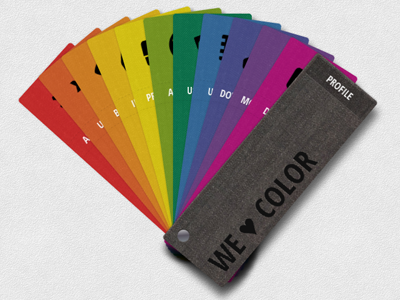
Playing with skeuomorphism: a tutorial on how to create a swatch book like component with CSS3 + JS (jQuery plugin): http://goo.gl/3nqxF
12 months ago
Beautiful animation and effect! Personally, I'd like to see a 5th demo in which you hover over the option to make it selected (the rest move away to reveal it) instead of requiring a click on the element to interact with it. This would allow a user to quickly browser what options are there vs having to click on it to interact and view what the color represents.
Again, wonderful job!
12 months ago
Hi Timothy! Thanks so much for your feedback! I've played with that but it's quite messy when using hover since you are basically always hovering over something here :) Another approach that I thought might be practical is to rotate the text -90 degrees and translateY -50px, so that you can actually see it with the items being closed... thx again and I'm really glad you like it! Cheers
12 months ago
@Manoela Ilic What if they moved based on where the mouse was? As you move closer to another item, the "active" one disappears more and the new one becomes more apparent? So they are almost always "moving" until you activate one. Also, I know this is just a demo, but for "practicality" if this was a menu, a user would have to click once to view what the option was and click again if they wanted to actually go to that page.
12 months ago
cool :)
12 months ago
Great idea,love it :)
11 months ago
nice @Manoela Ilic +10 ;)
7 months ago