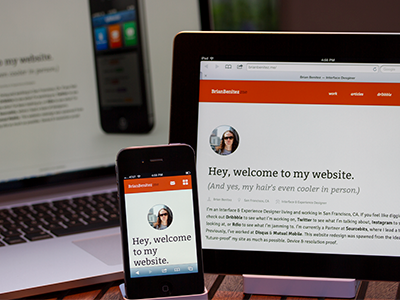
So, this isn't entirely ready—but here's what I've been working on. It's nearly there, just need to finish porting over the portfolio section...annnnd maybe write a blog post or two.
That headline text is pretty large on the phone, bro.
Also! Those smart object edges are brutal and the timing on the transitions in the phone feel a little awkward. Like the images don't stick around long enough and they fade a little too quickly.
should you bump the point size of "Hey, welcome to my website" down a size for the iPhone version? That would create two lines instead of a three-line widow: "Hey, welcome to my ...website"
1. What is that iPad stand?
2. I want to see more of that pretty face. It'll help with gaps.
3. Why did you mix social with main nav? I'm real curious.
4. The iPhone on the homepage with roll over activation is sweet.
5. Heh I wanna read articles! jeez brian.
Overall I really like your responsive strategy. I think with a few little tweaks this will be right where you want it :) keep cranking.
@Matt Bainton Thanks for the email, haven't got a chance to check it out yet—but definitely will. Thanks for taking the time, man—really appreciate it!
@Nick Sloggett Answers:
1. It's a regular one. (I just ghetto-rigged it for landscape for photo purposes, lol.)
2. Meaning I should have a bigger picture rather than a small avatar? (If that's what you mean—you're the 2nd person to say that to me, so there must be something too it.)
3. I felt I could justify mixing social in with the nav on my personal blog (generally, I wouldn't do this) because to me, they're all weighted pretty much equally. That, and I feel like it's clear enough where you're going when you click the link that says "twitter" or "dribbble."
4. Rollover activation?
5. I'll write some! Get off my back, jeeze!
Thanks for the words of encouragement, Nick! Keep the suggestions coming!
No problem, Brian. Glad to take the time to explain some of the "why". If you ever want to chat about it I'm up for some responsive web dev/design discussion.
There seems to be a bug related to using ";" rather than "," in your meta viewport tags, causing the device-pixel-ratio to not get set correctly (and breaking your JS that relies on that value), resulting in non-@2x images to display in the slider.
Couple notes, on FF your font's are getting jacked (no styles) http://cl.ly/3m20271A0M1p3C1Y1z0N & just my opinion... I think it would be better to see your pic left aligned to the copy in the iPhone layout, mainly because the copy is left justified, plus I'm always looking for an excuse to not center things :P
@Bryant Florez Whoaaaaa, ewww FF! Thanks for catching that—that'd be embarrassing!
Funny you say that about the avatar, though. That's the way I originally had it and it felt weird. I think I'm going to come up with a different solution, but a solution nonetheless ;)
26 Responses (page 1 of 2)
Pro
Brian Benitez
So, this isn't entirely ready—but here's what I've been working on. It's nearly there, just need to finish porting over the portfolio section...annnnd maybe write a blog post or two.
Anyway—future proof, bitches.
Don't dig around too deep yet.
Update: Decided to revert to my old site until I have the time to properly finish this one. I got a bit ahead of myself. Sorry.
11 months ago
I see something familiar ;)
11 months ago
Pro
Brian Benitez
@Dan Higbie Dannnng, that's a pretty good suggestion. I think I might do just that ;)
I wasn't feeling right about that all that whitespace anyway.
11 months ago
Pro
Matt McDaniel
That headline text is pretty large on the phone, bro.
Also! Those smart object edges are brutal and the timing on the transitions in the phone feel a little awkward. Like the images don't stick around long enough and they fade a little too quickly.
Overall, though, it's looking pretty cool.
11 months ago
Great work @Brian Benitez and @Jeff Broderick. Love the color scheme and typography choices.
A critique is that your main nav has some awkward overlapping going on between 480 - 700px. I've sent an email with quick ideas on fixing it.
11 months ago
Pro
Drew Wilson
Great work my child!
That photo doesn't even really look like u ... How did u do that?!
11 months ago
Pro
matt yow
should you bump the point size of "Hey, welcome to my website" down a size for the iPhone version? That would create two lines instead of a three-line widow: "Hey, welcome to my ...website"
11 months ago
Pro
Evan Huwa
Looks nice Brian.
11 months ago
Pro
Brian Benitez
Thanks for the suggestions, guys. I've actually incorporated most of it already. What do you think? @Dan Higbie @matt yow and @Matt McDaniel
11 months ago
Pro
Nick Sloggett
1. What is that iPad stand?
2. I want to see more of that pretty face. It'll help with gaps.
3. Why did you mix social with main nav? I'm real curious.
4. The iPhone on the homepage with roll over activation is sweet.
5. Heh I wanna read articles! jeez brian.
Overall I really like your responsive strategy. I think with a few little tweaks this will be right where you want it :) keep cranking.
11 months ago
Pro
Brian Benitez
@Matt Bainton Thanks for the email, haven't got a chance to check it out yet—but definitely will. Thanks for taking the time, man—really appreciate it!
@Nick Sloggett Answers:
1. It's a regular one. (I just ghetto-rigged it for landscape for photo purposes, lol.)
2. Meaning I should have a bigger picture rather than a small avatar? (If that's what you mean—you're the 2nd person to say that to me, so there must be something too it.)
3. I felt I could justify mixing social in with the nav on my personal blog (generally, I wouldn't do this) because to me, they're all weighted pretty much equally. That, and I feel like it's clear enough where you're going when you click the link that says "twitter" or "dribbble."
4. Rollover activation?
5. I'll write some! Get off my back, jeeze!
Thanks for the words of encouragement, Nick! Keep the suggestions coming!
11 months ago
Pro
Brian Benitez
@Drew Wilson It was either that one or this one.
11 months ago
Pro
Drew Wilson
@Brian Benitez LOLZ .. u obviously picked WRONG!
11 months ago
Pro
Mani
nice @Brian Benitez
11 months ago
Pro
Claus Hollensteiner
Nice! The text needs way more line-height!
11 months ago
I'd consider making your paragraphs two columns for landscape display on the iPad. Your line-length is getting pretty.. lengthy!
11 months ago
No problem, Brian. Glad to take the time to explain some of the "why". If you ever want to chat about it I'm up for some responsive web dev/design discussion.
11 months ago
Pro
Chris Brauckmuller
This is really cool man. What kind of camera did you use to take the photo?
11 months ago
Pro
Forefathers™
This looks nice. I like the menu icon you gave once it hits mobile phone
11 months ago
Pro
Christian Boyle
Nice progress.
There seems to be a bug related to using ";" rather than "," in your meta viewport tags, causing the device-pixel-ratio to not get set correctly (and breaking your JS that relies on that value), resulting in non-@2x images to display in the slider.
Bug fix: http://byl.cc/L26LgJ
11 months ago
Pro
Marshall Bock
I can confirm: the hair truly is cooler in person.
11 months ago
Pro
Brian Benitez
Thanks for the tip, @Christian. I'll check it out!
11 months ago
Pro
Bryant Florez
Good stuff, Brian!
Couple notes, on FF your font's are getting jacked (no styles) http://cl.ly/3m20271A0M1p3C1Y1z0N & just my opinion... I think it would be better to see your pic left aligned to the copy in the iPhone layout, mainly because the copy is left justified, plus I'm always looking for an excuse to not center things :P
11 months ago
really nice
11 months ago
Pro
Brian Benitez
@Bryant Florez Whoaaaaa, ewww FF! Thanks for catching that—that'd be embarrassing!
Funny you say that about the avatar, though. That's the way I originally had it and it felt weird. I think I'm going to come up with a different solution, but a solution nonetheless ;)
Thanks for the feedback, dude!
@Andrey Thanks!!
11 months ago