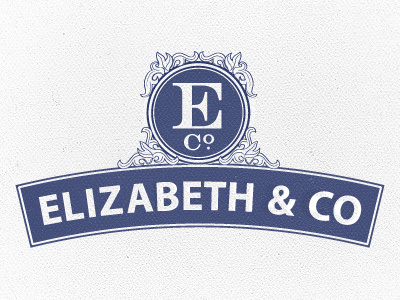
And here goes round 2! Changed the typeface to a humanist sans per suggestions from @Jeff and @Claire, fixed the stroke per @Neil's suggestion, and per @Jillian's great feedback I tracked out the type, simplified the ornamentation, and added weight to the serif characters, etc. How does this work?
Definitely much better. I think the two things that are still kinda irking me are having "Co." twice. Just seems repetitive...and that big ol' E in the circle just feels like its cramped.... Crazy idea, but maybe blow that circle up bigger so the bottom most point overlaps the other background shape a little? Might bring the two shapes together too...
Great improvement, Joseph! The weight balance between serif and non-serif is much better. What would take this to the next level is to adjust the letterforms to better follow the curve of the banner. There's good information on this in Leslie Cabarga's book Logo, Font & Lettering Bible. Well worth the investment if you don't already have it.
Good to hear some of the issues were solved @Jillian! I tried to hold on to that "Co" in the monogram but if you really think it's a bad idea I should take your word for it! ;D Then the "E" would have more room, also. Good idea on overlapping the shapes, I'd intended to do that earlier but somehow forgot it in the process.
Yeah I agree @Ben, it's a little more open and not quite so heavy. I feel you on the more uneven strokes, I'll have to find the balance between the two.
Thanks @Jeff! That book sounds like a veritable treasure chest, I'll have to look it up - thanks for mentioning it! Are you thinking of actually tweaking the characters, or improving on Illustrator's imperfectly curved baseline?
All good improvements! There is one thing I would consider adjusting. The ornaments seem to get lost when paired with the outer stroke on the circle and rectangle. Perhaps add a thicker stroke on just the perimeter of the ornamentation to tie it all in?
Just catching this now, fantastic improvements! That typeface works beautifully now, much more cohesive overall. I hate being late to comments.. always tricky to spot something that hasn't already been mentioned, haha. The ornamentation looks really nice too (you could almost get away with removing the inner-most thin white outline in the circle.. that said though, I do like that its weight helps to mirror the strokes of the flourishes).
11 Responses
And here goes round 2! Changed the typeface to a humanist sans per suggestions from @Jeff and @Claire, fixed the stroke per @Neil's suggestion, and per @Jillian's great feedback I tracked out the type, simplified the ornamentation, and added weight to the serif characters, etc. How does this work?
12 months ago
I feel like this one is lightyears from the other, just from the simple changes - and I loved the first version too! Great job.
12 months ago
I'd second that, you did a great job, Joe~
12 months ago
Definitely much better. I think the two things that are still kinda irking me are having "Co." twice. Just seems repetitive...and that big ol' E in the circle just feels like its cramped.... Crazy idea, but maybe blow that circle up bigger so the bottom most point overlaps the other background shape a little? Might bring the two shapes together too...
12 months ago
This typeface is working a lot better I think. What I did like about the last one was the differentiating stroke widths on the motif.
Looks great!
12 months ago
Great improvement, Joseph! The weight balance between serif and non-serif is much better. What would take this to the next level is to adjust the letterforms to better follow the curve of the banner. There's good information on this in Leslie Cabarga's book Logo, Font & Lettering Bible. Well worth the investment if you don't already have it.
12 months ago
Thanks @Whitney! Tiny changes can really make a big difference, can't they! It's the difference between polished and amateur.
Thanks @Patrick!
Good to hear some of the issues were solved @Jillian! I tried to hold on to that "Co" in the monogram but if you really think it's a bad idea I should take your word for it! ;D Then the "E" would have more room, also. Good idea on overlapping the shapes, I'd intended to do that earlier but somehow forgot it in the process.
Yeah I agree @Ben, it's a little more open and not quite so heavy. I feel you on the more uneven strokes, I'll have to find the balance between the two.
Thanks @Jeff! That book sounds like a veritable treasure chest, I'll have to look it up - thanks for mentioning it! Are you thinking of actually tweaking the characters, or improving on Illustrator's imperfectly curved baseline?
12 months ago
Tweaking the characters. Here's an example of what I mean:
http://is.gd/mu3sR7
12 months ago
All good improvements! There is one thing I would consider adjusting. The ornaments seem to get lost when paired with the outer stroke on the circle and rectangle. Perhaps add a thicker stroke on just the perimeter of the ornamentation to tie it all in?
12 months ago
Just catching this now, fantastic improvements! That typeface works beautifully now, much more cohesive overall. I hate being late to comments.. always tricky to spot something that hasn't already been mentioned, haha. The ornamentation looks really nice too (you could almost get away with removing the inner-most thin white outline in the circle.. that said though, I do like that its weight helps to mirror the strokes of the flourishes).
12 months ago
Thanks @Claire! You're right, I should probably remove that stroke. Removing things is always the hard part but it's also very important!
12 months ago