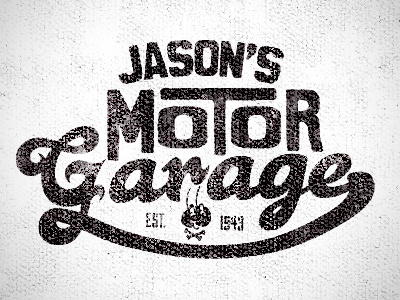
thanks @Joe, the texture isn't vectorized, still haven't found a good/consistent way of doing that yet - if you have a good strategy for this let me know!
@Justin Barber I'm always trying chase after similar look in vector form. Especially for shirt printing. How would you setup something like this for a screenprinter? Are you just giving them a greyscale image?
@Joe Cavazos in my experience so far, i've just given a hi-res photoshop file for the distressed look...of course some of the mid-range distressed areas are lost in the print (since printed values are obviously either 100% or 0%), so it's not a completely accurate representation and can be rather hit or miss sometimes depending on application.
7 Responses
Pro
Justin Barber
t-shirt design
11 months ago
Pro
Nicholas D'Amico
nice!!!
11 months ago
Pro
Joe Cavazos
Love this Justin. Is the texture vectorized?
11 months ago
Pro
Justin Barber
thanks @Joe, the texture isn't vectorized, still haven't found a good/consistent way of doing that yet - if you have a good strategy for this let me know!
11 months ago
Pro
Joe Cavazos
@Justin Barber I'm always trying chase after similar look in vector form. Especially for shirt printing. How would you setup something like this for a screenprinter? Are you just giving them a greyscale image?
Heres a tut I came across the other day that helps with some vector texturing. http://methodandcraft.com/videos/vintage-effects-within-illustrator
11 months ago
Pro
Justin Barber
@Joe Cavazos in my experience so far, i've just given a hi-res photoshop file for the distressed look...of course some of the mid-range distressed areas are lost in the print (since printed values are obviously either 100% or 0%), so it's not a completely accurate representation and can be rather hit or miss sometimes depending on application.
thanks for the link! i'll check it out
11 months ago
This is beautiful. I really like your Script G and R. Great texture. I'm digging your style my friend.
3 months ago