


@Jeff Broderick omnigraffle is a pain in the ass and super ugly but you should check out mindnode its pretty bare bones but does exactly what you need :)
Yeah charts are always a pain. When I want more control over the appearance of a chart I end up using Illustrator. I feel it's a little more flexible than Photoshop when you want be able to quickly move shapes around.
However the less time you put into sketches, wireframes, flow-charts, and other non-deliverables, the less committed you are and the easier it is to discard them. Getting attached to an idea for the wrong reasons (personal investment) can be dangerous. Of course this is all based on two assumptions:
1. The flow-chart is not a deliverable
2. It takes you considerably longer making them pretty
Keynote is a great tool for quick and easy wireframing and flowcharting ... easy to make look "pretty" too, but without a huge time investment. Also, can export as PDF, which is a nice bonus.
@Maximilian we are in agreement about them not being deliverables. If you are 100% freelance, however it really helps to build a template style to use in every project you hand over.
I was able to increase my rates to $150+/hr base on the client looking over some (pretty rough wireframes) that happened to look 'nice'. I'm not suggestion taking advantage, but it's helped sell potential customers many times to see a consistent style in all my portfolio (wireframes give them an idea of how i approach process)
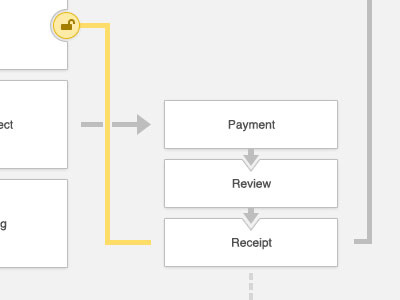
Still having fun with this flowchart. I hate flowcharts and figured the best way for me to enjoy it is to make it pretty. :) I am having fun and accomplishing a lot. It doesn't add much time to my process and I have something I am proud of.
What do you guys think? :-/
Don't forget to join the Jump.TV Beta! Should be live in a few days. :)
As per the tools used to create flows or wires, Illustrator or InDesign are pretty good, and frankly it should not take that much longer to create a nice flow chart. As a UX designer flow charts are part of the deliverables showed to clients, and having them look slick and clear helps guide the client through, so it's a win win. Even for freelancer you should add wireframes to your design process, it helps clients understand your thoughts behind your ideas, it builds a certain confidence and trust which becomes useful at later stages.
It might not be the prettiest, but I just started using LucidCharts.com and it's fast as hell. The controls are real intuitive especially for creating flow diagrams.
24 Responses
Pro
Jeff Broderick
Why can't flow charts be prettier and easier?! What do you use for creating them?
Don't forget to join the Jump.TV Beta! Should be live in a few days. :)
12 months ago
Pro
Matt McDaniel
What did you use to create that?
12 months ago
Pro
Jeff Broderick
@Matt The tool I am best at: Photoshop. :-X
12 months ago
Pro
Matt McDaniel
I am disappoint. I (also) want a better tool for stuff like this.
12 months ago
@Jeff Broderick omnigraffle is a pain in the ass and super ugly but you should check out mindnode its pretty bare bones but does exactly what you need :)
12 months ago
Guys. I see an opportunity here. "Flowww Chartr". Hahah.
Do you put this sort of dedication into all of your site designs?
12 months ago
Pro
Zach Forrester
Full pixels or it didn't happen.
(Also, looks gorgeous)
(Also, I want to built this as a real tool)
12 months ago
Pro
Joe Kennedy
This looks sooo nice! I would definitely use this if it were an actual app.
12 months ago
Pro
Dhiren Adesara
nice !
12 months ago
Looks very soft. I'd love to see the full view.
12 months ago
Pro
Tanveer Junayed
Very pretty Jeff. I use my white board at the very first stage.
12 months ago
Pro
Paul Ungureanu
This makes designers talk to developers to make it happen ;)
12 months ago
Yeah charts are always a pain. When I want more control over the appearance of a chart I end up using Illustrator. I feel it's a little more flexible than Photoshop when you want be able to quickly move shapes around.
12 months ago
Pro
Court Kizer
@jeff if you set a style in omnigraffle, then you only need type and outline and it will build your charts like this automatically.
All my outlines look beautiful this way.
12 months ago
Pretty.
Omnigraffle every time for me.
Remember guys flows are not deliverables. Quick, dirty, easy to understand and update.
12 months ago
Pretty indeed.
However the less time you put into sketches, wireframes, flow-charts, and other non-deliverables, the less committed you are and the easier it is to discard them. Getting attached to an idea for the wrong reasons (personal investment) can be dangerous. Of course this is all based on two assumptions:
1. The flow-chart is not a deliverable
2. It takes you considerably longer making them pretty
A book I really enjoyed on this subject is Sketching User Experiences by Bill Buxton.
12 months ago
Pro
Matt Gentile
always clean work! +1
12 months ago
Love the 'lock' icon. :)
12 months ago
Pro
Matt Johnson
I usually agree with this flow, but I found http://slickplan.com to be a decent tool both in functionality and looks.
Comes down to picking the right tool for the job.
12 months ago
Pro
Chuck Mallott
Keynote is a great tool for quick and easy wireframing and flowcharting ... easy to make look "pretty" too, but without a huge time investment. Also, can export as PDF, which is a nice bonus.
12 months ago
Pro
Court Kizer
@Maximilian we are in agreement about them not being deliverables. If you are 100% freelance, however it really helps to build a template style to use in every project you hand over.
I was able to increase my rates to $150+/hr base on the client looking over some (pretty rough wireframes) that happened to look 'nice'. I'm not suggestion taking advantage, but it's helped sell potential customers many times to see a consistent style in all my portfolio (wireframes give them an idea of how i approach process)
12 months ago
Rebound
Flow Chart - User flow
by Jeff Broderick
Still having fun with this flowchart. I hate flowcharts and figured the best way for me to enjoy it is to make it pretty. :) I am having fun and accomplishing a lot. It doesn't add much time to my process and I have something I am proud of.
What do you guys think? :-/
Don't forget to join the Jump.TV Beta! Should be live in a few days. :)
12 months ago
Pro
Antoine Bonnin
Looking good.
As per the tools used to create flows or wires, Illustrator or InDesign are pretty good, and frankly it should not take that much longer to create a nice flow chart. As a UX designer flow charts are part of the deliverables showed to clients, and having them look slick and clear helps guide the client through, so it's a win win. Even for freelancer you should add wireframes to your design process, it helps clients understand your thoughts behind your ideas, it builds a certain confidence and trust which becomes useful at later stages.
12 months ago
It might not be the prettiest, but I just started using LucidCharts.com and it's fast as hell. The controls are real intuitive especially for creating flow diagrams.
12 months ago