Untitled-1

20 Responses

  1. Jackie Tran Anh Jackie Tran Anh

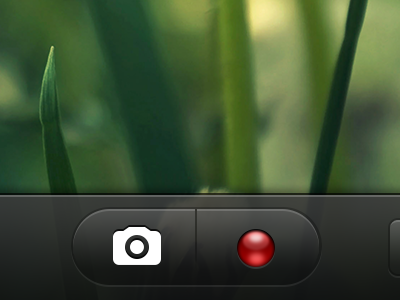
    Currently working on a camera app called Edgy.
    Separation buttons for taking picture and recording video.

    about 1 year ago

  2. Matt Kump? Matt Kump?

    Interesting idea… what advantages do you see in having them so close like that?

    likes

    about 1 year ago

  3. Prekesh Chavda Prekesh Chavda

    u can record and take photos of everything with one tap

    likes

    about 1 year ago

  4. Eli Schiff Eli Schiff

    Cool! I wonder if there's a metaphor that allows you to maintain a glyph or icon based UI for both the buttons. Have you thought about a non-glyph lens icon embedded on the left?

    likes

    about 1 year ago

  5. Matt Kump? Matt Kump?

    Ya I guess the speed would be good at an event where you're constantly snapping or shooting. I can definitely see my clumsy thumbs mistapping a lot, but I'm a doofus.

    about 1 year ago

  6. Nick Sloggett Nick Sloggett

    actually have a lot of stats from working with photobucket that this is a bad idea from a ux standpoint.

    about 1 year ago

  7. Garrett Gee Garrett Gee

    Love the subtle transparency

    about 1 year ago

  8. Matt Kump? Matt Kump?

    Care to elaborate @Nick Slogget?

    likes

    about 1 year ago

  9. Jackie Tran Anh Jackie Tran Anh

    @Eli Schiff well I actually have thought about it. But I want to keep it native.

    likes

    about 1 year ago

  10. Eli Schiff Eli Schiff

    @Jackie Tran Cool. Looking forward to seeing how this shapes up

    about 1 year ago

  11. Aric Aric

    very nice!

    about 1 year ago

  12. ididi ididi

    nice!

    about 1 year ago

  13. Nick Sloggett Nick Sloggett

    @Matt Kump hey dude, toggling on the only major action, is very un-natural. Users looked for the standard toggle to switch from either picture/video (reference ios' camera app). The users tapped the wrong part constantly, and were really frustrated when they missed the moment because of the toggle.

    likes

    about 1 year ago

  14. Haziq Mir Haziq Mir

    Was working on a similar 'light' the day before. This is better.

    about 1 year ago

  15. Lennart Ziburski Lennart Ziburski

    @Nick Slogget That should depend on the type of app really. If the core feature of the app is the camera, and if it replaces the native camera app, there shouldn't be a problem with understanding the new UI when first starting the app (which you usually do immediately after purchasing). That way, users shouldn't struggle to adapt when they really need to use the app.

    If, on the other hand, the camera is not the main feature of the app and you'll probably only try it when you really need it, it's probably a safer bet to go with the default UI.

    As this seems to be a pure camera app, I think introducing a new UI should not be a problem. I do agree, however, that they are fairly close. Especially for one-handed use.

    likes

    about 1 year ago

  16. Nick Sloggett Nick Sloggett

    @Lennart Ziburski we literally did user tests that had thousands of people. Its a main button, there isn't a successful app of the market today that splits functionality like this, whether its a camera app or not.

    A lot of assumptions in your comment :)

    about 1 year ago

  17. Lennart Ziburski Lennart Ziburski

    @Nick Slogget Yeah, I'm just assuming here - I obviously haven't made any user tests as you were able to.

    My point is this:
    When introducing such an UI that works totally different than one of the basic UIs people are used to while looking similar to it, you either need to get the user to play around with the UI himself or explain it to him.

    I assume that users of the Photobucket app did not try the camera UI before needing it because
    a) there are a a lot of other screens to browse in the app and they assumed the camera UI to behave like the default one (because most apps don't change it)
    b) using the camera in the Photobucket app seems to be associated with uploading pictures. Even though you might be able to snap pictures with it without uploading, that association probably prevented many from trying it out before real-world use.

    So I definitely think such an UI is possible by either having an app that encourages trying out the camera or by explaining the UI to users before. Both could be possible with a pure camera app, as the camera UI is probably the core feature you market. I don't think the current app situation is an indication on whether this concept can work.

    Again, these are obviously just my thoughts on this and I don't have much insight into how exactly your user tests looked like. Maybe you did exactly what I said and people are just that weird. ;)

    Feels weird to write long comments on Dribbble...

    likes

    about 1 year ago

  18. Nick Sloggett Nick Sloggett

    ^ That sir is a damn comment haha. You are more than welcome to email me :D

    people should write longer comments :) that way it promotes better design :D

    likes

    about 1 year ago

  19. Nigel Evans Nigel Evans

    weird name for a camera app ... great GUI design so far though :D

    about 1 year ago

  20. Andrey S. Rodrigues ☝ Andrey S. Rodrigues ☝

    nice

    about 1 year ago

keyboard shortcuts: previous shot next shot L or F like