


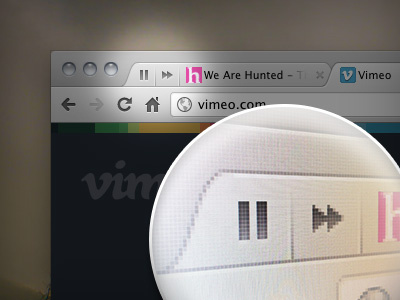
Made a quick mockup of audio controls that browsers could add to their tabs. Because something that I find a bit frustrating with audio in browser is this:
Imagine you listen to a web radio, like in this example We Are Hunted. Now somebody tweets a link to a video, you click it, but before you can watch the video you have to hunt down the audio that is playing in one of the tabs and try to find the pause button so you don't get it mixed with the video.
A solution could be that browser tabs would expose a button when audio is detected. So you could quickly pause them while staying active on your current one. It might also would make sense to have a standard API/spec that websites could use. Like a "skip to next song" which would be very handy to have quick access to.
Another thing (or maybe even instead of this) that would be great to have: An API that works with the audio keys on the keyboard, like you all are probably already using for iTunes, Spotify or so.
PS. I guess there are lots of implementation details to consider. So it might not be that simple, but just had to get it out anyways.
Update: For Grooveshark, there is a status bar app that works with keyboard shortcuts.
@Matthew Farag Yes, thought the same. But sometimes audio could be just a short alert or other audio effects, in that case it shouldn't stop the current playing music. Maybe it could only switch when both use a common spec/API that are meant for longer audio like music/videos/podcasts and not just any audio.
@Bennett Feely Haa.. Going back to 2008! Ya, seems tricky to do. There are browser extensions trying to solve this problem, but still limited in functionality.
47 Responses (page 1 of 2)
Pro
simurai
Made a quick mockup of audio controls that browsers could add to their tabs. Because something that I find a bit frustrating with audio in browser is this:
Imagine you listen to a web radio, like in this example We Are Hunted. Now somebody tweets a link to a video, you click it, but before you can watch the video you have to hunt down the audio that is playing in one of the tabs and try to find the pause button so you don't get it mixed with the video.
A solution could be that browser tabs would expose a button when audio is detected. So you could quickly pause them while staying active on your current one. It might also would make sense to have a standard API/spec that websites could use. Like a "skip to next song" which would be very handy to have quick access to.
Another thing (or maybe even instead of this) that would be great to have: An API that works with the audio keys on the keyboard, like you all are probably already using for iTunes, Spotify or so.
PS. I guess there are lots of implementation details to consider. So it might not be that simple, but just had to get it out anyways.
Update: For Grooveshark, there is a status bar app that works with keyboard shortcuts.
about 1 year ago
Pro
Rich Smith
Cool idea :) Not sure how do-able it would be though, but i guess there's always a way...
about 1 year ago
Pro
Matthew Sanders
Fun exploration.
about 1 year ago
i feel the frustration, good mock :)
about 1 year ago
Pro
Carlos Gavina
That would be perfect for musify, wonder if that will happen one day. The favicon giving a status of the player isn't enough..
about 1 year ago
Pro
Marian Friedmann ⚓
You are still on Leopard?
about 1 year ago
Pro
Zach Forrester
Great idea, great execution.
about 1 year ago
Really great idea.
about 1 year ago
OMG want!
about 1 year ago
Pro
Matthew Farag
Alternatively (or additionally) all audio would automatically pause when the frontmost tab's audio starts playing.
about 1 year ago
yes, I'm having trouble with that issue also :D
about 1 year ago
Pro
simurai
@Matthew Farag Yes, thought the same. But sometimes audio could be just a short alert or other audio effects, in that case it shouldn't stop the current playing music. Maybe it could only switch when both use a common spec/API that are meant for longer audio like music/videos/podcasts and not just any audio.
about 1 year ago
Pro
simurai
@Marian Friedmann ⚓ Hehe.. how can you tell? Yes, still on Snow Leopard. My MacBook doesn't let me install Lion, already too old. ;-(
about 1 year ago
This idea has totally been discussed before. Apparently detecting if a browser tab is playing audio much easier said than done. http://code.google.com/p/chromium/issues/detail?id=3541
Still love this shot. Looks awesome!
about 1 year ago
Pro
Thani Suchoknand
I have always wanted this!
about 1 year ago
Pro
simurai
@Bennett Feely Haa.. Going back to 2008! Ya, seems tricky to do. There are browser extensions trying to solve this problem, but still limited in functionality.
about 1 year ago
Pro
Michael Orcutt
I told firefox to do this years ago.. still waiting!
about 1 year ago
Pro
Isaac Grant™
How about a simple pause flash and audio button on the tab?
about 1 year ago
Pro
Marian Friedmann ⚓
@simurai The big, bulky window controls in the upper left corner. :P
about 1 year ago
Pro
M khalid khan
Good solution :)
about 1 year ago
Pro
Samuel Couto
Genius UI!
about 1 year ago
That's brilliant. Awesome!
about 1 year ago
Pro
Ralph Manning
Great idea!
about 1 year ago
@simurai ingenious work. Hope to see it included in all browsers :).
about 1 year ago
Pro
Victor Erixon
Very nice idea!
about 1 year ago
