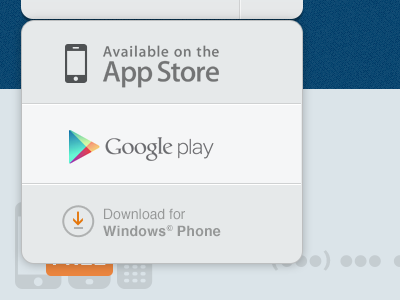
yeah, i'm with @Haziq Mir, the inconsistent type and layout for each creates a bit of a compositional yardsale. the logos aren't aligned to any visual anchor (they are neither equally left-aligned nor center with each other), the appstore type is also fuzzy compared to the crispness of the two subsequent. i'd challenge branding requirements in favor of making your own work look good in this case.
the shadow on the widget itself feels right though.
Looks fantastic! I agree with what others have said, though. It feels like the icons should be horizontally centered in relation to each other, with the type left-aligned. The App Store text is attracting more attention because of its size too. Maybe a tad smaller?
@Kerem Suer The icons should be somehow leveled in terms of visibility ... The Apple Appstore clearly stands out. There is also an icon for the Windows Phone Marketplace you could use that. One other thing ... the download symbol for windows phone is not exactly pixel perfect... the arrow is not aligned with center of the circle or the gray horizontal line and the circle definitely has a .something coordinate in the PSD. Hope this helps.
@Kerem Suer Are these compliant? From my experience you can't modify the badges provided by the stores. I could be wrong and would love to be wrong on this. I'm currently working on something that uses the App Store, Google Play and App World.
18 Responses
Pro
Kerem Suer
Dropdown menu, Google play is the hover state.
about 1 year ago
Pro
Shaun Moynihan
Really nice. Looking forward to seeing more of this in context of the overall layout...
about 1 year ago
Pro
Haziq Mir
I'm bothered by the different icon dimensions. A little more spacing between the icons and the text, perhaps?
about 1 year ago
Pro
Shaun Moynihan
His intent (correct me if I'm wrong @Kerem Suer) was to use the recognized buttons for each platform.
about 1 year ago
Pro
Nick Sloggett
Pretty sure all of that is the required spacing/sizing right? I know the app store is app standard and so is the google play.
about 1 year ago
yeah, i'm with @Haziq Mir, the inconsistent type and layout for each creates a bit of a compositional yardsale. the logos aren't aligned to any visual anchor (they are neither equally left-aligned nor center with each other), the appstore type is also fuzzy compared to the crispness of the two subsequent. i'd challenge branding requirements in favor of making your own work look good in this case.
the shadow on the widget itself feels right though.
about 1 year ago
Looks great
about 1 year ago
Pro
Jordan Flaig
awesome idea!
about 1 year ago
gotta agree with others - the marketplace icons / text needs some work fersure.
about 1 year ago
Apart from what everyone else said, it looks pretty nice!
about 1 year ago
Pro
Anthony Forier
Looks fantastic! I agree with what others have said, though. It feels like the icons should be horizontally centered in relation to each other, with the type left-aligned. The App Store text is attracting more attention because of its size too. Maybe a tad smaller?
about 1 year ago
Pro
Alexandru Antihi
@Kerem Suer The icons should be somehow leveled in terms of visibility ... The Apple Appstore clearly stands out. There is also an icon for the Windows Phone Marketplace you could use that. One other thing ... the download symbol for windows phone is not exactly pixel perfect... the arrow is not aligned with center of the circle or the gray horizontal line and the circle definitely has a .something coordinate in the PSD. Hope this helps.
about 1 year ago
Pro
Oykun
killing it with your awesome colors!
about 1 year ago
nice!
about 1 year ago
Pro
Dan Flynn
nice work! appreciate you not having the buttons stray away from their recognized branding.
about 1 year ago
Pro
Rally Interactive (via Ben...
Looks great, but are those some blurry edges I see or just the stroke color achieving that illusion?
about 1 year ago
Pro
Kerem Suer
@Rally Interactive (via Ben Cline) yes there are all sorts of blurry edges and weirdnesses, thank you all awesome people for pointing these out. :)
about 1 year ago
@Kerem Suer Are these compliant? From my experience you can't modify the badges provided by the stores. I could be wrong and would love to be wrong on this. I'm currently working on something that uses the App Store, Google Play and App World.
Apple Guidelines
https://developer.apple.com/appstore/AppStoreMarketingGuidelines.pdf
Google Play
http://developer.android.com/distribute/googleplay/promote/brand.html
5 months ago