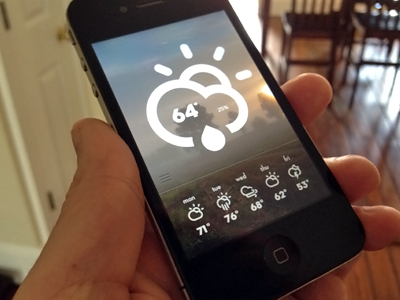
Working on the slide up action that will reveal some extended weather details behind the main area. You can see the lift point starts at the horizontal line.
Hey Bill this is looking really nice - wanted to ask if these are just mock screen shots of the app you did or are you building the actual app while developing out the idea? I haven't touched on iOS apps yet but I'm seriously looking in to it and wondered if you could give me a little insight in to what you are developing this with etc? Sorry if it's a dumb question for those that already do this kind of thing but I gotta start somewhere :)
@Jonathan These are just proofs right now. We don't develop iOS apps at the moment but might start dabbling at some point. This was just a design itch I had to scratch but might look to team up with someone and bring it to life.
Hey Bill - thanks for taking the time to answer - that kinda makes sense - I guess my next question would be so the sliding action you show are simply photoshopped images on to the screen after taking the photo? ie a composite as such?
Anyways, I really like the concept here I just have to agree with the cloudy / windy icon, just doesn't really seem to convey the condition very well - maybe better with a cloud and 3 lines out the back of it to show windy movement? I dunno, the the current one seems to look like a cloud with a penis :)
@Jonathan correct. I created all the sliding actions and design states needed in photoshop. Noted on the icon. It comes from an awesome set from @Adam Whitcroft and although I agree with some of what you've said, I still like the icon :)
Really nice! The only thing I'd say is how you have the current temperature and percentage in the glyph. Some glyphs, like the rain one, don't have empty space inside. I would think of another place to put this info.
54 Responses (page 1 of 3)
Pro
Bill S Kenney
I can't be the only guy without a weather app design. Props to @Adam Whitcroft for his awesome icons seen here → http://dribbble.com/shots/544084-Climacons
Working on the slide up action that will reveal some extended weather details behind the main area. You can see the lift point starts at the horizontal line.
Created with the Focus Lab team
about 1 year ago
Pro
John Bjerke
Fantastic. I'm continually amazed by the lack of good weather app options on iOS. Still looking...
about 1 year ago
Pro
Alexander Zhestkov
nice :)
about 1 year ago
Pro
Kreativa Studio
Oh, just awesome! Love the style!
about 1 year ago
Pro
Yura Yarokhovich
simple. cool )
about 1 year ago
Pro
Martin Kuoppa
beautiful.
about 1 year ago
Beautiful!
about 1 year ago
Pro
Andrianov Oleg
Awesome ☂
about 1 year ago
Pro
Anke Mackenthun
gorgeous :)
about 1 year ago
Pro
Zach Lipson
Beautiful...but I have no idea what that wednesday icon is
about 1 year ago
Pro
Kyle Chicoine
@Zach Lipson Wednesday icon looks like wind.
@Bill S Kenney lovely!! Nice work.
about 1 year ago
Simple and hot! Love it
about 1 year ago
Wednesday = Cloudy and windy! DUH :P
about 1 year ago
Pro
Gil
Sweet dude!
about 1 year ago
Rebound
Slide up
by Bill S Kenney
Slide it up to reveal a collection of data for that day. I might cut down on the shadow a bit.
about 1 year ago
Pro
Bill S Kenney
Thanks everyone!!!
@Zach that is windy =)
about 1 year ago
Hey Bill this is looking really nice - wanted to ask if these are just mock screen shots of the app you did or are you building the actual app while developing out the idea? I haven't touched on iOS apps yet but I'm seriously looking in to it and wondered if you could give me a little insight in to what you are developing this with etc? Sorry if it's a dumb question for those that already do this kind of thing but I gotta start somewhere :)
about 1 year ago
What is the idea behind the photos in the background? Are they arbitrary to represent the current conditions from a database of images?
about 1 year ago
Pro
Bill S Kenney
@Jonathan These are just proofs right now. We don't develop iOS apps at the moment but might start dabbling at some point. This was just a design itch I had to scratch but might look to team up with someone and bring it to life.
about 1 year ago
Pro
Bill S Kenney
@Anthony That is the idea at the moment.
about 1 year ago
Hey Bill - thanks for taking the time to answer - that kinda makes sense - I guess my next question would be so the sliding action you show are simply photoshopped images on to the screen after taking the photo? ie a composite as such?
Anyways, I really like the concept here I just have to agree with the cloudy / windy icon, just doesn't really seem to convey the condition very well - maybe better with a cloud and 3 lines out the back of it to show windy movement? I dunno, the the current one seems to look like a cloud with a penis :)
btw love your OpenCoach shots too.
about 1 year ago
Pro
Bill S Kenney
@Jonathan correct. I created all the sliding actions and design states needed in photoshop. Noted on the icon. It comes from an awesome set from @Adam Whitcroft and although I agree with some of what you've said, I still like the icon :)
about 1 year ago
Pro
Christian Dalonzo
Really nice! The only thing I'd say is how you have the current temperature and percentage in the glyph. Some glyphs, like the rain one, don't have empty space inside. I would think of another place to put this info.
about 1 year ago
Wow .. Good style Bill !
about 1 year ago
Pro
Eric Hoffman
Race ya to the app store ;)
about 1 year ago