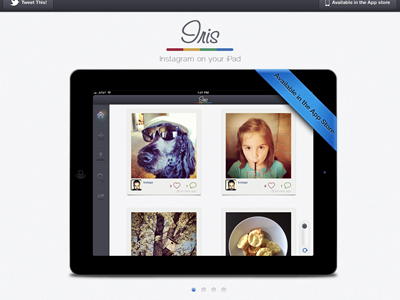
Iris App For iPad's New Site

Snap

1 Attachment

20 Responses

  1. Pro Eric Hoffman Eric Hoffman

    about 1 year ago

  2. Pro Gijs Rogé Gijs Rogé

    Awsome :) (you might wanna tone down that big ass sprite on the site, it removes the meaning of a sprite I still see the buttons load on hover and click :P)

    likes

    about 1 year ago

  3. Pro Tanveer Junayed  Tanveer Junayed 

    @Eric Hoffman :: This one is amazing. Always with your great style Eric!

    likes

    about 1 year ago

  4. Pro Eric Hoffman Eric Hoffman

    Um @Gijs Rogé if you have loaded the sprite and are able to hover the buttons then its impossible you are seeing it load again. THat would mean its making another HTTP request which is absolutely, categorically impossible.

    But I appreciate the feedback.

    likes

    about 1 year ago

  5. Pro Gijs Rogé Gijs Rogé

    @Eric Hoffman Yes i understand that part, but the sprite itself takes 5 seconds (or more) to load. So naturally you will see the buttons load (wich I find annoying). Personally I would split the buttons and the images. But again, nonetheless awsome site, really love the simplicity :)

    likes

    about 1 year ago

  6. Pro Danny Keane Danny Keane

    Really nice work dude, the app looks great!

    likes

    about 1 year ago

  7. Pro Eric Hoffman Eric Hoffman

    @Danny Keane Thanks man!

    likes

    about 1 year ago

  8. Pro Ryan Le Roux Ryan Le Roux

    She's a beauty!

    likes

    about 1 year ago

  9. Pro Hugo França Hugo França

    Great work!!!

    likes

    about 1 year ago

  10. Pro Jack Bingham Jack Bingham

    You sir, are good at design, you know.

    likes

    about 1 year ago

  11. Alden Haley Alden Haley

    The site looks really good. One thing I noticed is that the shadow under the mag glass icon is really large. You might consider shrinking it down to the size of the one under the heart or pin point.

    likes

    about 1 year ago

  12. Pro Leon Bolwerk Leon Bolwerk

    You make THE best work! Instant like for me!

    likes

    about 1 year ago

  13. Pro Oykun Oykun

    love it! so much better! I still would go for white iPad in there though :)

    about 1 year ago

  14. Pro Joseph P. Albanese Joseph P. Albanese

    Did you switch from a black iPad to a white one? If so, why did you switch it up?

    about 1 year ago

  15. Pro Rob Davis Rob Davis

    great work, one envious designer here :)

    about 1 year ago

  16. Danny Giebe Danny Giebe

    love that. well i think i would use 3 images grid for landscape mode and 2 for portrait mode. takes to much time only see 2 at once. But good app.

    about 1 year ago

  17. Pro Avinash Tripathi Avinash Tripathi

    love it!

    about 1 year ago

  18. Pro Fabio Benedetti Fabio Benedetti

    @Eric Hoffman nice one Eric ++

    about 1 year ago

  19. Nemanja Milosevic Nemanja Milosevic

    maybe you can try with other color under iris... and maybe you need to improve left sidebar you can do it better than that I know :D application has beautiful interface btw :D

    about 1 year ago

  20. Andrey S. Rodrigues ☝ Andrey S. Rodrigues ☝

    very great Eric

    about 1 year ago

keyboard shortcuts: previous shot next shot L or F like