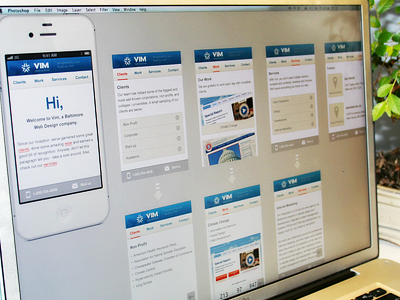
This post is more like sharing how I work... I'm designing mobile version of viminteractive.com. Here I created whole screens with basic lines to see big picture, now time to polish them slightly :)
I know you can't see much, but this is how/what I'm working on...
Update: I like to see related screens while I design, it gives me better feeling of connectivity between actions/screens, and easier to grab mutual elements ;)
Update 2: people keep asking via twitter, etc: the plant is bonsai :-)
@Pete Orme I don't have template as it changes for each project, but I can prepare this one quickly at weekend and attach to the post for your download :)
@Daniel Vernon Thanks mate! glad it gave some inspiration :)
I work like that on mobile stuff, too. I also like to convert every teaser or module into a smart object in collect them in a seperate folder inside my PSD, so I can have a look how all of them compare to each other - not only in the screen they're used in.
This is a technique that I've been using for the last few months but using Illustrator. After a decade of working in Photoshop for this type of work, I firmly believe that it just isn't the right tool for the job. If, however, I need to design some sort of texture or something similar, I can just link to that PSD file in Illustrator and make my edits. Upon saving that PSD file, Illustrator updates its file to the latest version of that PSD.
Great job. I think Photoshop should implement a template system the way inDesign and Fireworks do (with master templates etc). Would make it so much easier. Even just having multiple "art boards" like illustrator would be nice...
I'd love to see how you setup your layers & folders here since you would have one giant PSD. Nice setup. Also, what type of plant is that in the background?
@Stephen Dixon I totally agree with you. Working with vectors in Illustrator works much better for me that photoshop. I think we're in the minority though!
I use the same technique except I prefer to use Fireworks. This layout is also good for presenting concepts as I sometime include comments on the flow etc under each screen.
I prefer to do this in AI on secondary display/monitor, (import psd's + autoupdate when i save them whole im working in PS)
Also just in case you don't use this already, give it a try:
http://zambetti.com/projects/liveview/ it's helpful tool when designing for iOS devices. :)
54 Responses (page 1 of 3)
Pro
Oykun
This post is more like sharing how I work... I'm designing mobile version of viminteractive.com. Here I created whole screens with basic lines to see big picture, now time to polish them slightly :)
I know you can't see much, but this is how/what I'm working on...
Update:
I like to see related screens while I design, it gives me better feeling of connectivity between actions/screens, and easier to grab mutual elements ;)
Update 2:
people keep asking via twitter, etc: the plant is bonsai :-)

about 1 year ago
Pro
Pete Orme
Really like this setup Oykun, do you have a PSD template for the basic layout of this? (less your beautiful design work of course! ;))
about 1 year ago
Pro
Daniel Vernon
Mate that is great, never thought of doing it this way!
Thank you for sharing.
about 1 year ago
Pro
Oykun
@Pete Orme I don't have template as it changes for each project, but I can prepare this one quickly at weekend and attach to the post for your download :)
@Daniel Vernon Thanks mate! glad it gave some inspiration :)
about 1 year ago
Pro
Dennis Covent
That's smart, good technique!
about 1 year ago
I work like that on mobile stuff, too. I also like to convert every teaser or module into a smart object in collect them in a seperate folder inside my PSD, so I can have a look how all of them compare to each other - not only in the screen they're used in.
about 1 year ago
Pro
Adrian Mato
So sad you are using Fireworks... that kind of organization will be more versatile, faster and better :P
EDIT: lol I wanted to said I'm sad because you are NOT using Fireworks!
about 1 year ago
@Adrián Mato I could have sworn the application name in the top-left said "Photoshop" ;)
about 1 year ago
Pro
Chris Striepecke
nice! thanks for sharing
about 1 year ago
Nice :) Hope you could attach a full size screenshot.
about 1 year ago
good way to work
about 1 year ago
Great work. I'd love to have a template Oykun
about 1 year ago
Pro
Stephen Dixon
This is a technique that I've been using for the last few months but using Illustrator. After a decade of working in Photoshop for this type of work, I firmly believe that it just isn't the right tool for the job. If, however, I need to design some sort of texture or something similar, I can just link to that PSD file in Illustrator and make my edits. Upon saving that PSD file, Illustrator updates its file to the latest version of that PSD.
about 1 year ago
Pro
Pete Orme
Oykun - you're a legend, thanks!
about 1 year ago
Pro
Christopher Magruder
Really great way of getting the entire app look and feel while designing. Nice work!
about 1 year ago
Great job. I think Photoshop should implement a template system the way inDesign and Fireworks do (with master templates etc). Would make it so much easier. Even just having multiple "art boards" like illustrator would be nice...
about 1 year ago
Pro
Timothy Whalin
I'd love to see how you setup your layers & folders here since you would have one giant PSD. Nice setup. Also, what type of plant is that in the background?
about 1 year ago
Pro
Curtis Estridge
Nice, I'm going to start doing this.
about 1 year ago
Great organisation Oykun!
about 1 year ago
@Stephen Dixon I totally agree with you. Working with vectors in Illustrator works much better for me that photoshop. I think we're in the minority though!
about 1 year ago
Pro
Joshua McCowen
Nice! Thanks for sharing. I'm always interested in fellow designer workflows.
about 1 year ago
@Oykun Yilmaz - You're in Manchester? For some reason I thought you were US based. Loving your work buddy!
about 1 year ago
Pro
Marcelo Novaes
That's really nice!
about 1 year ago
I use the same technique except I prefer to use Fireworks. This layout is also good for presenting concepts as I sometime include comments on the flow etc under each screen.
about 1 year ago
I prefer to do this in AI on secondary display/monitor, (import psd's + autoupdate when i save them whole im working in PS)
Also just in case you don't use this already, give it a try:
http://zambetti.com/projects/liveview/
it's helpful tool when designing for iOS devices. :)
about 1 year ago