Tintype-tim-square

Flare

Shot_1280338959

68 Responses (page 1 of 3)

  1. Pro Tintype-tim-square Tim Van Damme

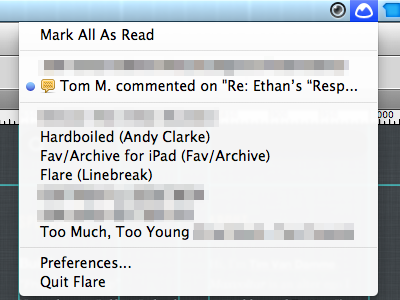
    We just sent out the first beta to some passionate testers, and thought it might be time to share the interface. I dribbbled this before, but removed the shot after it went public and we (the Cloud.app guys and myself) weren't sure we'd ever finish this app :)

    almost 2 years ago

  2. Me-avatar Josh Pyles

    Ohh shiny!

    almost 2 years ago

  3. Pro Avatar_darkroom Scott Gledhill

    looking forward to it!

    almost 2 years ago

  4. Heroku-avatar-original Maximilian Schoening

    OMG this is like so totally, like, awesome!

    almost 2 years ago

  5. Xentek-768x768 Eric Marden

    I can haz? Looks like its going to be super useful to the community,.

    almost 2 years ago

  6. Pro Op Oscar Palmér

    I am so relieved that you made it look native, read good, and didn't make something awkward (eg. Notify).

    likes

    almost 2 years ago

  7. Pro Hellmanndavid David Hellmann

    oh tim, i need the beta :)

    almost 2 years ago

  8. Pro Photo-10 Travis Hines

    I wonder if the Basecamp mountain colourizes when you have an unread message. Maybe rings of smoke can rise from it too ;)

    Looks fuckin-A, Tim!

    likes

    almost 2 years ago

  9. Avatar-default Alan Hogan

    I don’t understand what Flare is :-/

    almost 2 years ago

  10. Pro Gav Gavin Elliott

    It is very awesome to use. One of those things you wish you thought of first or had to use a long time ago.

    Nice work Tim!

    almost 2 years ago

  11. Pro Photo_oct_27__9_07_38_pm_copy Henry Moran

    @Alan Flare is : "A Mac OS X menubar app that monitors the activity in your Basecamp accounts."

    almost 2 years ago

  12. Pro Tintype-tim-square Tim Van Damme

    @All: After months of working on this, it means the world to us that you like Flare.

    @Alan Hogan: Mac OS X menubar app that notifies you of new activity on your Basecamp accounts.

    likes

    almost 2 years ago

  13. Avatar-default Alan Hogan

    Thanks for explaining. Sounds useful!

    almost 2 years ago

  14. Avatar Mike Garrett

    Niiiiice! I'm excited to see it.

    almost 2 years ago

  15. Pixelavatar_large_16_color Chris Wallace!

    Hey Tim, can I get an invite for the beta?

    chris at liftux.com would be the best place to send it.

    almost 2 years ago

  16. Pro Morse-profilepic Jacob Morse

    I'm running it and loving it already. Basecamp + Growl - Email = Win.

    almost 2 years ago

  17. Esquareda-square-black-white Eric E. Anderson

    Lovin' it!

    almost 2 years ago

  18. Apple-touch-icon Luke Dorny

    WOULD LOVE THIS!

    almost 2 years ago

  19. Pro Gedy Gedy Rivera

    I would totally love to use this. Can't wait.

    almost 2 years ago

  20. Kevin Kevin Steigerwald

    Soooo, what are the chances of someone being able to knockout a menubar notifier for Dribbble?

    This looks great, Tim. As an avid Basecamp user I can see how this will make life and work that much easier.

    almost 2 years ago

  21. 180_180 Thomas Maier

    You don’t know Radar.app, don’t you. :P
    It looks very nice and seems far more organized than Radar.

    http://www.madewithbits.com/

    almost 2 years ago

  22. Pro Tintype-tim-square Tim Van Damme

    @Thomas Maier: The guy who built Radar contacted me after I tweeted about an idea I had for an app. By then I already made a deal with the Cloud.app crew. So both apps are inspired by the same idea, yet the execution couldn't be more different.

    likes

    almost 2 years ago

  23. Pro Twitter250 Nick Toye

    I'm sorry, but am I missing something here? Isn't this just the standard dropdown you get from all Menubar applications?

    almost 2 years ago

  24. Pro Tintype-tim-square Tim Van Damme

    @Nick Toye: Exactly, can't get more minimalistic than that!

    likes

    almost 2 years ago

  25. Pro Twitter250 Nick Toye

    @Tim Van Damme, I love your work I truly do - but I'm not sure what design has been done here?

    almost 2 years ago

keyboard shortcuts: previous shot next shot L or F like