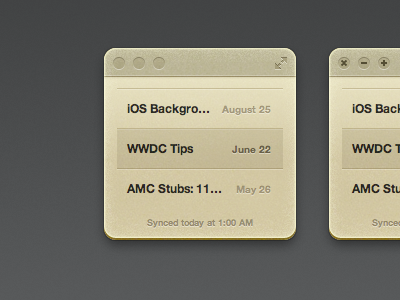
I'm not sure if this is final yet, but I decided to tweak the window design for the Notefile Mac app I've been working on. The more I polished the design, the more apparent it became that the previous design wasn't quite working. There were two main problems:
• If you scrolled down, the text at the top just kind of looked cut off. Because of the buttons at the top, I couldn't set it up the same way I set up the iOS app and widget. I needed something for the text to scroll up underneath.
• I set up the window so you can drag it from any "empty" area. This doesn't work as well as it does with a widget though, and it was hard even for me to tell where you could actually drag from. With a visual bar along the top, it's much nicer—you have an area to aim for.
So I tried to come up with something that's a little more like a standard Mac app, but still looks like Notefile.
This screenshot shows the app at its tiniest size possible. At smaller sizes it'll work like the iPhone app or widget. If you expand it to a large enough size, it'll split into a two pane view, more like the iPad version.
Anyway. I'm digging this now, but we'll see how much I hate it on Monday.
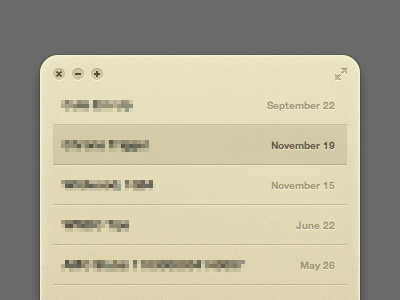
I think this version is a bit too noisy compared to the previous version. I'd simply make some kind of fold into the note to keep it's minimalistic approach.
Max: That's similar to the divider that appears on the bottom when there's more content than fits in the window. I considered using it on the top as well, but… Hmm, I'm struggling to explain exactly why, but something about it feels really off to me.
I think part of it is that there are already four different buttons up there. Since everything is floating inside the window, that line adds another separate element, and it emphasizes the four buttons even more. To me that feels busier than having a bar that ties all those components together into one thing.
Hmm.. I really feel like the TitleBar is killing the simplicity of the design. Maybe you should think again and try to find a more realistic/natural approach. How would this design function in real life? Maybe it wouldn't even scroll or maybe it would have two dividers.
Or you have a divider at the top and a gradient (so that it fades out) on the bottom.
Or if you really want to stick with the TitleBar you can make it look like a binding.
7 Responses
Pro
Mike Piontek
I'm not sure if this is final yet, but I decided to tweak the window design for the Notefile Mac app I've been working on. The more I polished the design, the more apparent it became that the previous design wasn't quite working. There were two main problems:
• If you scrolled down, the text at the top just kind of looked cut off. Because of the buttons at the top, I couldn't set it up the same way I set up the iOS app and widget. I needed something for the text to scroll up underneath.
• I set up the window so you can drag it from any "empty" area. This doesn't work as well as it does with a widget though, and it was hard even for me to tell where you could actually drag from. With a visual bar along the top, it's much nicer—you have an area to aim for.
So I tried to come up with something that's a little more like a standard Mac app, but still looks like Notefile.
This screenshot shows the app at its tiniest size possible. At smaller sizes it'll work like the iPhone app or widget. If you expand it to a large enough size, it'll split into a two pane view, more like the iPad version.
Anyway. I'm digging this now, but we'll see how much I hate it on Monday.
6 months ago
Pro
Nobtaka Nukui
Can't wait.
6 months ago
Rebound
Notefile fold suggestion
by Max Fellmuth
I think this version is a bit too noisy compared to the previous version. I'd simply make some kind of fold into the note to keep it's minimalistic approach.
6 months ago
Pro
Mike Piontek
Max: That's similar to the divider that appears on the bottom when there's more content than fits in the window. I considered using it on the top as well, but… Hmm, I'm struggling to explain exactly why, but something about it feels really off to me.
I think part of it is that there are already four different buttons up there. Since everything is floating inside the window, that line adds another separate element, and it emphasizes the four buttons even more. To me that feels busier than having a bar that ties all those components together into one thing.
6 months ago
Pro
Max Fellmuth
Hmm.. I really feel like the TitleBar is killing the simplicity of the design. Maybe you should think again and try to find a more realistic/natural approach. How would this design function in real life? Maybe it wouldn't even scroll or maybe it would have two dividers.
Or you have a divider at the top and a gradient (so that it fades out) on the bottom.
Or if you really want to stick with the TitleBar you can make it look like a binding.
6 months ago
Pro
Max Fellmuth
Right now it just steals too much attention.
6 months ago
Love this.
6 months ago