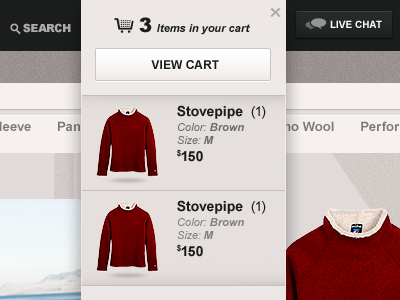
It shows on click or on mouse over?
I'm saying that because I would expect the drop down disappears once I mouse out the mini-cart. Instead of using the "x" button to close it.
Nice graphics btw!
I was looking at your comp, which obiciously is awesome. The only element that stood out to me that didn't have the polish of the rest of the comp was the quantity data set, "(1)"
Spent 5 mins and did a quick mock up of an idea. You can maybe give them a more graphical treatment so they look hierarchically different from the other text in the area. This might help because all the other text is about the product, and this data set is how many.
The 2nd row maybe I went too far. Added a drop down ability to give users the ability to effect this item without having to actually view their cart. They can do stuff like change quantity or remove from cart, all from a simple drop down. Again, might be too much functionality for such a simple area... OR it could be super useful, depending on the rest of the sites UX.
9 Responses
Pro
Rally Interactive (via Ben...
For an e-commerce site.
over 1 year ago
Pro
Kreativa Studio
Looking slick!
over 1 year ago
Pro
Rally Interactive (via Ben...
@Kreativa Thanks!
over 1 year ago
Pro
Zane David
so clean and sexy!
over 1 year ago
cute!
over 1 year ago
Pro
Samuel Couto
It shows on click or on mouse over?
I'm saying that because I would expect the drop down disappears once I mouse out the mini-cart. Instead of using the "x" button to close it.
Nice graphics btw!
over 1 year ago
This looks great, really love the shadow under the sweaters.
over 1 year ago
Pro
Adam Pickering
Pretty cart drop down, LIKE
over 1 year ago
Rebound
An idea...
by Anthony Dines
I was looking at your comp, which obiciously is awesome. The only element that stood out to me that didn't have the polish of the rest of the comp was the quantity data set, "(1)"
Spent 5 mins and did a quick mock up of an idea. You can maybe give them a more graphical treatment so they look hierarchically different from the other text in the area. This might help because all the other text is about the product, and this data set is how many.
The 2nd row maybe I went too far. Added a drop down ability to give users the ability to effect this item without having to actually view their cart. They can do stuff like change quantity or remove from cart, all from a simple drop down. Again, might be too much functionality for such a simple area... OR it could be super useful, depending on the rest of the sites UX.
over 1 year ago