Settings_dribbble

29 Responses (page 1 of 2)

  1. Sebastiaan de With Sebastiaan de With

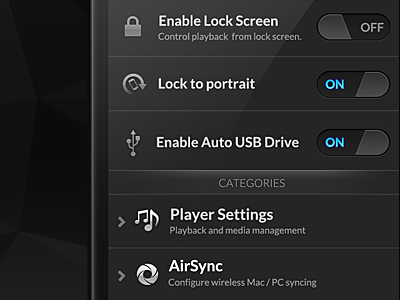
    doubleTwist has been updated, with a facelift I've been working on for a while. While there's really amazing (dare I say magical?) things coming in the future, I am happy with the interactions and major changes in this release.

    Being fed up with the state of Android typography, this release has us bundling a completely new, fantastic font family that works extremely well with OLED and LCD screens alike and allows beautiful typography like in this new settings screen. If you have an Android phone, run, don't walk, to the Android Market.

    likes

    over 1 year ago

  2. j j

    Never cease to amaze Sebastiaan!

    over 1 year ago

  3. Mike Hall Mike Hall

    This is awesome stuff! I'd be interested to see how those switches animate on/off. Don't have an android :/

    likes

    over 1 year ago

  4. App Juice App Juice

    i Just updated, and it's amazing. Probably the best design android app out there :)

    likes

    over 1 year ago

  5. Tim Kendall Tim Kendall

    Design some more Android apps!

    likes

    over 1 year ago

  6. Prathyush Prathyush

    Just saw this today when I installed it on my friend's Android and said wow! to myself. The diagonally sliced switches are a nice touch.

    over 1 year ago

  7. R712 R712

    love the black! + shiny blue!

    over 1 year ago

  8. Todd Coleman Todd Coleman

    Those toggle buttons are excellent.

    likes

    over 1 year ago

  9. Facundo Gonzalez Facundo Gonzalez

    Incredible work.

    over 1 year ago

  10. Haziq Mir Haziq Mir

    Y U SO AWESOME?!

    over 1 year ago

  11. Timothy ッ Timothy ッ

    Sexy UI dude! Are those custom icons?

    over 1 year ago

  12. Andrea Cau Andrea Cau

    Love this new type of switch so much. Great work Sebastiaan as always.

    over 1 year ago

  13. Mike Beecham Mike Beecham

    Hi there, as an Android user and Android UI designer I share your frustration with the Typography (Droid Sans....really?). I love what you've done with this and will update the app soon.

    Loving those slide buttons, by the way!

    over 1 year ago

  14. Paul Jackson Paul Jackson

    Yeah, I'd love to see the switches in action too. Video!

    over 1 year ago

  15. Baldoph Baldoph

    I'm sure those switches have actually this shape
    /---------- \
    so when you scroll well... the rounded edges are just a mask you see...
    YOU SEE WHAT I MEAN?
    edit: i give up

    likes

    over 1 year ago

  16. Jonatan Castro Jonatan Castro

    sexyness

    over 1 year ago

  17. Mladen Zivanovic Mladen Zivanovic

    Looks awesome. Hope the day comes when stock Android looks like this.

    over 1 year ago

  18. Tim de Groot Tim de Groot

    I like the switches very much.

    over 1 year ago

  19. Jack Bingham Jack Bingham

    Love those switches and the icon treatment. I personally love Droid Sans and this font doesn't look that far from it. What font is this?

    likes

    over 1 year ago

  20. Phil Lester Phil Lester

    Also interested in what font this is -- please share!

    over 1 year ago

  21. Anton Kudin Anton Kudin

    amazing
    keep it up and android team will have to snatch you! :)

    over 1 year ago

  22. Trevor Gerzen Trevor Gerzen

    If you did an Android specific design workshop I would attend it. This is one of only a handful of beautifully designed apps on Android. There *really* isn't very many apps that even designed at all, let along well designed. Seriously impressive. I haven't purchased the additional features yet but I will soon just to see your designs in action.

    likes

    over 1 year ago

  23. Andrew Firstenberger Andrew Firstenberger

    I really like this take on the toggle UI.

    over 1 year ago

  24. Guillaume Gaubert Guillaume Gaubert

    I would be interested in seeing the toggle animation for the toggle button, I mean, how it flips horizontally.

    over 1 year ago

  25. Daniel Vernon Daniel Vernon

    Solid work, so impressive!

    over 1 year ago

keyboard shortcuts: previous shot next shot L or F like