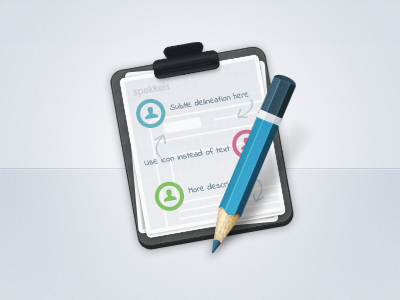
Really need help with those jaggy edges on the writing pad part. Tried with mask blurring and adjusting levels but still not satisfied with the result. Comments, feedback and tips are highly appreciated.
@kajdax tried 45 degrees but doesn't look right :D
but seriously, I've tried several angles, it doesn't help. The weird thing is, that pencil edges looks so much better than the writing pads and the paper. I'm clueless.
@noptar in fact, it's much worse if I remove the outline :(
I use stroke with 35% opacity to reduce those jaggy edges.
But maybe Kajdax is right, there must be an angle where the edges are evenly antialiased or at least less jaggy.
40 Responses (page 1 of 2)
Pro
Fares Farhan
Really need help with those jaggy edges on the writing pad part. Tried with mask blurring and adjusting levels but still not satisfied with the result. Comments, feedback and tips are highly appreciated.
7 months ago
Try another angle :)
7 months ago
Pro
Fares Farhan
@kajdax tried 45 degrees but doesn't look right :D
but seriously, I've tried several angles, it doesn't help. The weird thing is, that pencil edges looks so much better than the writing pads and the paper. I'm clueless.
7 months ago
Pro
Mani
if there is outline then remove it :)
7 months ago
Pro
Fares Farhan
@noptar in fact, it's much worse if I remove the outline :(
I use stroke with 35% opacity to reduce those jaggy edges.
But maybe Kajdax is right, there must be an angle where the edges are evenly antialiased or at least less jaggy.
7 months ago
Pro
Mani
use outer glow or drop shadow then see the results :)
7 months ago
Pro
Fares Farhan
@noptar ah, haven't tried that. I'll update the result here. Thanks a lot!
7 months ago
Pro
Diego Monzon
I love it the way it is
7 months ago
Pro
Mani
ok try one thing your angle must be in round figure it could be any angle not in decimals i have tried :)
7 months ago
Pro
Fares Farhan
@Diego you're simply too kind. Thank you very much Diego, means a lot coming from you :)
7 months ago
Pro
Anton Kudin
blur (5-10) the mask then use levels or brightness-contrast to adjust it back to sharp mode. i hope i make sense :)
7 months ago
Pro
AndyTheJoker
Really good work. You did it with Photoshop? I bet you've created and then rotated.
7 months ago
Pro
Fares Farhan
@Anton didn't tried with the settings you mentioned. I'll definitely give it a shot. Thanks a lot Anton :)
7 months ago
Pro
Fares Farhan
@Andy what are you? mind reader? :D yes, you're correct Andy. Should I do it in different way?
7 months ago
Pro
AndyTheJoker
@Fares AHAH! It's a stupid problem of Photoshop. Try to create the Base_Shape on Illustrator. :)
7 months ago
Pro
Fares Farhan
@Andy How didn't I think of that.. Thanks a ton dude!
7 months ago
Pro
AndyTheJoker
@Fares Don't mention it my Friend. :) I'm glad to have helped you.
7 months ago
Pro
Robbie Pearce
Excellent, really love that pencil! :D
7 months ago
Pro
Fares Farhan
@Robbie Thanks :)
7 months ago
Pro
Wade Meredith
That pencil is gorgeous.
7 months ago
Very nice Fares!
7 months ago
Pro
Chris Farina
Love the pencil!
7 months ago
Pro
Jason Wu
Great icon and great tips from the comments.
7 months ago
Pro
Aditya Nugraha Putra
Smantabh!!
highly skilled icon designer juga ini mah ;)
Popular juga :D
7 months ago
Pro
Aen Tan
Photoshop Smart Object? Those things always have rough edges.
7 months ago