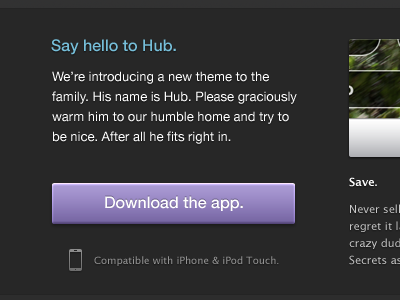
Purple rain, puuurrrple rain.

Screen_shot_2011-11-02_at_00

13 Responses

  1. Pro James ✌ James ✌

    A lil' su, su.

    over 1 year ago

  2. Pro Jonathan Moore Jonathan Moore

    I'm loving the simplicity and depth of the "Download the app." button.

    The only thing that's not holding up for me is the text aliasing in the design. Ultimately it will not matter once things are built, but if you set the text aliasing in Photoshop to Sharp or Strong it should look amazing.

    over 1 year ago

  3. Pro James ✌ James ✌

    Ewwwww sharp text aliasing in Photoshop is absolutely rank rotten (imo). To be fair, all of Photoshops text rendering options are pretty bad.

    likes

    over 1 year ago

  4. Pro Stuart Regan Stuart Regan

    Mm.. Purple! :)

    What are the font's used here for the body text and button? K-thx.

    likes

    over 1 year ago

  5. Pro Mason Yarnell Mason Yarnell

    Nice one, James. Really like the purple. The "Say hello to Hub" header blue clashes a bit with the purple. Not necessarily a bad thing.

    likes

    over 1 year ago

  6. Pro James ✌ James ✌

    @Stuart: Helvetica Neue and Lucida Sans.

    likes

    over 1 year ago

  7. R712 R712

    I love purple+skyblue!

    likes

    over 1 year ago

  8. Pro Shaun Moynihan Shaun Moynihan

    Looks great James...always enjoy the colors you use.

    likes

    over 1 year ago

  9. Charlie via Issland. Charlie via Issland.

    Nice work on it James ;-)

    likes

    over 1 year ago

  10. Pro Jack Bingham Jack Bingham

    Really nice. I always use Crisp text anti-aliasing. Do you get on better with Sharp?

    likes

    over 1 year ago

  11. Pro James ✌ James ✌

    Crisp or Smooth. Sharp is terrible, renders it so yucky!

    likes

    over 1 year ago

  12. Pro Marshall Bock Marshall Bock

    Love that lavender :D

    likes

    over 1 year ago

  13. Mike Smith Mike Smith

    This looks really slick. and +1 for the Crisp anti-aliasing. I hate all of Photoshop's options though

    likes

    over 1 year ago

keyboard shortcuts: previous shot next shot L or F like