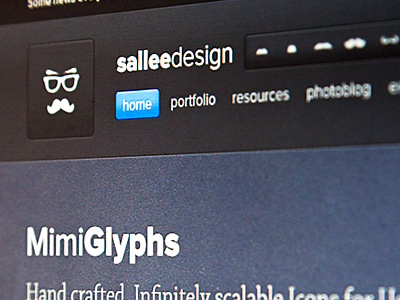
I was working on the upcoming page for the release of mimiglyphs v2. And of course, like every time I work on my site I got distracted by other elements and decided to very slightly modify my header. Give it more room to breath especially.
Thx Jan! Yes I thought it would be a nice touch to show those vector shapes combined with some grid/pixel effect since after all they are very small vector shapes intended for small icon size :)
@Leon: thx man! I might change it to this one just to give a little more room to the header. it's not much css to change this the most is done and no html will be changed.
@jonathan: thx mate :) Yes I love minimal clean and easy to use and understand things :)
@Stuart Wagner: unfortunately the patern under the detailed part is just a snapshot of the icon in photoshop in full zooming. I used a subtle texture under that icon and in full zoom in gives that pixelated feeling :)
Thx Jeff. The set will be for free, so no need to buy anything :) As for a CSH file, I could do it, but those icons are really made for 16px and resizing them will need to retouch the icon if you want it pixel perfect. But I can give both, the psd and the CSH :)
Thx Shaun and Jonathan! I'm coding the page and the new header as i'm writting this :)
@Shaun: yeah the set is kinda complete. But I think this is just a v2 since I would like to get to a 250 icons set little by little :) But willl release this version in the meantime :)
I'm finally very proud to present you mimi glyphs v2. Took me a while to get everything settled, but I'm very happy with the result.
I've added a .csh photoshop file to the pack as requested by jeff Just keep in mind if you use the .csh file that those icons were made for a 16px base and are crafted for that. Increasing drastically the size of the icon may make it look bad and way too simple.
Enjoy them. I've been using them in my past projects and I love them!
24 Responses
I was working on the upcoming page for the release of mimiglyphs v2. And of course, like every time I work on my site I got distracted by other elements and decided to very slightly modify my header. Give it more room to breath especially.
Live page here.
If you have any opinion about if I should change my header to this, I'll be happy to know.
Also if you have any opinion about the mimiGlyph presentation, I'll be happy to know too ;)
over 1 year ago
Thx leon. So you think the actual header on my site is better, or this one (in the snap) is better?
over 1 year ago
Pro
Jan Kovařík
I'm a big fan of the "right side with detail of icon" :) Neat!
over 1 year ago
Thx Jan! Yes I thought it would be a nice touch to show those vector shapes combined with some grid/pixel effect since after all they are very small vector shapes intended for small icon size :)
over 1 year ago
Pro
jonathan olsen
Wow that is really nice! I love the minimalism of the whole site
over 1 year ago
@Leon: thx man! I might change it to this one just to give a little more room to the header. it's not much css to change this the most is done and no html will be changed.
@jonathan: thx mate :) Yes I love minimal clean and easy to use and understand things :)
over 1 year ago
Dig the site!
over 1 year ago
Thx Ryan!
over 1 year ago
Love it.
over 1 year ago
Pro
Liam McKay
You need to stop being so awesome!
over 1 year ago
Pro
Timothy ッ
Achievement Unlocked: Pixel Wizarrd!! Epic!
over 1 year ago
thx Scott, Joel, Liam and Timothy!
over 1 year ago
Pro
Thomas Norsted
Very nice.. but no website is better than it's content and you icons kick a** :)
over 1 year ago
Pro
Stuart Wagner
It's simply awesome! The detailed view is just killer!
PS: Love the pattern you've got behind that detailed view. Mind sharing? :)
over 1 year ago
thx guys
@Stuart Wagner: unfortunately the patern under the detailed part is just a snapshot of the icon in photoshop in full zooming. I used a subtle texture under that icon and in full zoom in gives that pixelated feeling :)
over 1 year ago
Pro
Jeff Broderick
Make sure you include a Photoshop CSH file and I will def buy it. :D
over 1 year ago
Thx Jeff. The set will be for free, so no need to buy anything :) As for a CSH file, I could do it, but those icons are really made for 16px and resizing them will need to retouch the icon if you want it pixel perfect. But I can give both, the psd and the CSH :)
over 1 year ago
Pro
Shaun Moynihan
Looks great man....and congratulations on completing the set =]
over 1 year ago
Pro
Jonathan Moreira
Concerning the header, I much more prefer this version. You need to implement it Jeremy!
And your glyphs are awesome! Congrats mate :D
over 1 year ago
Thx Shaun and Jonathan! I'm coding the page and the new header as i'm writting this :)
@Shaun: yeah the set is kinda complete. But I think this is just a v2 since I would like to get to a 250 icons set little by little :) But willl release this version in the meantime :)
over 1 year ago
Very VERY well done.
over 1 year ago
Pro
Norm
Superb, looking forward to this release
over 1 year ago
thx Scott and Norm
@Norm: should be release fairly soon I think. Already started to code everything up :)
over 1 year ago
Rebound
Mimi Glyphs v2 free psd file
by Jeremy Sallée ✦✦✦
Mimi Glyphs.
Hand crafted, Infinitely scalable Icons for User Interface Designers
What’s in it: 80 icons, 16 by 16px. Photoshop file (each icon is an independent vector layer), CSH file & PNG.
Free for personal and commercial use.
download here
------------------------------------------
I'm finally very proud to present you mimi glyphs v2. Took me a while to get everything settled, but I'm very happy with the result.
I've added a .csh photoshop file to the pack as requested by jeff Just keep in mind if you use the .csh file that those icons were made for a 16px base and are crafted for that. Increasing drastically the size of the icon may make it look bad and way too simple.
Enjoy them. I've been using them in my past projects and I love them!
over 1 year ago