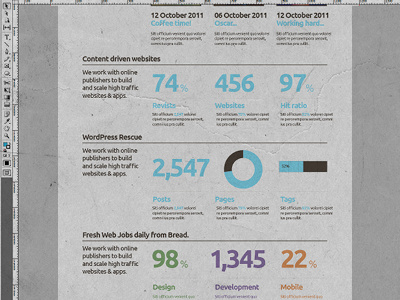
Website layout - Playing with grids, columns & stats...

Jq_dribbble55

9 Responses

  1. Pro Jonathan Quintin Jonathan Quintin

    Website layout - Playing with grids, columns & stats...
    Very rough, initial development.

    over 1 year ago

  2. Pro Jonathan Quintin Jonathan Quintin

    Yea Jens, that's a very good comment, shall look into getting a consistent title length.
    Ta

    over 1 year ago

  3. Pro Jonathan Quintin Jonathan Quintin

    Two lines might be quite nice actually, abit like the News section at the top, with two different accent colours. Actually that would add consistency, awesome:)

    over 1 year ago

  4. Website layout - Playing with grids, columns & stats... Another Concept.

    Another concept, have taken out the stats and have gone for a clean 3 colour set-up and a more modern look.

    over 1 year ago

  5. Scott Perket Scott Perket

    Maybe swap the title and the lines so the the content is contained within the lines? Very nice though.

    likes

    over 1 year ago

  6. Pro Jonathan Quintin Jonathan Quintin

    Cheers Scott, do you mean, just having the line and then the header and body below it?

    I just don't what the section title to lose impact or it's navigation duties.

    over 1 year ago

  7. Scott Perket Scott Perket

    Yeah, kind of like (forgive the crudeness)

    ___________________________
    TITLE
    Content etc
    ___________________________

    Basically just bumping down the support paragraph and swapping the title and the line. This would probably allow for bumping titles down onto a second line if too long and will help solve the title flowing too far to the right.

    Hope that helps!

    likes

    over 1 year ago

  8. Scott Perket Scott Perket

    Really dig your style, if you weren't in the UK, I'd offer you a job.

    likes

    over 1 year ago

  9. Pro Jonathan Quintin Jonathan Quintin

    Thanks Scott, that did work indeed, great feedback :)

    A very nice comment aswell, thanks.
    Jon

    likes

    over 1 year ago

keyboard shortcuts: previous shot next shot L or F like