Mike_piontek_2

Balloon Tip

3 Responses

  1. Pro Mike_piontek_2 Mike Piontek

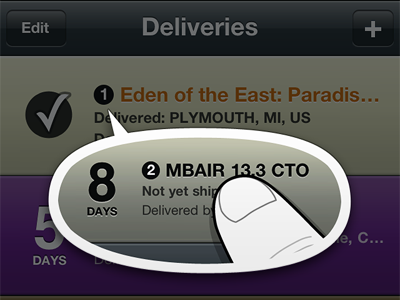
    Leaning toward something like this for the display of the animated tip. I tried a bunch of other options, including one that looked like a standard iOS alert, but they seemed too formal. The trickiest part is that I'm showing an image of a thing on top of that same thing. The irregular oval helps separate it much better than another rectangle (even if it is rounded).
    8 months ago

  2. Pro 6b820ba8-b9af-44ed-96b7-3075d2fdf1c0 Mitchell Bernstein

    VERY well thought out. People should start designing more apps like you! Although, you wouldn't be too original anymore, now would you ;P

    8 months ago

  3. Pro Mike_piontek_2 Mike Piontek

    Ha, thanks!

    So this was actually quite a challenge to implement:

    • Obviously I've designed this so that the balloon tail is pointing at a specific spot. The tricky part is that spot could move, it could get cut off if the device is rotated, or there may not be enough room at all if it's the last item in the list. So there are a bunch of checks to make sure it displays in the right spot, and it updates if the table gets scrolled for any reason. (I decided not to show it at all if the appropriate delivery is at the bottom of the screen, or I would have needed additional graphics and more code to point the tail the other way.)

    • I tried to dim the whole screen when it appears, but when the device was rotated the navigation bar and toolbar seemed to pop to the front at full brightness. In the end I decided to just dim the deliveries list, which actually works well.

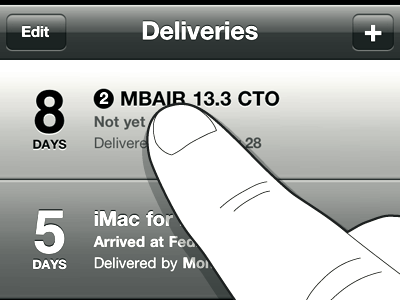
    • Interestingly I managed to get a really nice animation with just four frames total, repeated in a longer pattern. The finger taps twice, and it changes to show the second shipment. Then it taps twice again, and the finger changes to show the first shipment. It repeats until it's dismissed. Of course I also have Retina versions of each frame, but I was expecting to need much more to get it looking good. I also used a bit of Core Animation to fade out the table and have the balloon pop into view.

    • I also have an accessibility label for VoiceOver: "When an item starts with a number, tap it three times quickly to show the next shipment." Since VoiceOver makes things behave a bit differently, an extra tap is necessary.

    • Since all of this is for something that basically only shows once, I had to be careful to keep the code as minimal as possible so it's not affecting performance the other 99.9% of the time you're using the app.

    Whew!

    likes

    8 months ago

keyboard shortcuts: previous shot next shot L or F like