Me

About Disqus

Disqus_about_dribbble

1 Attachment

18 Responses

  1. Pro Me Brian Benitez

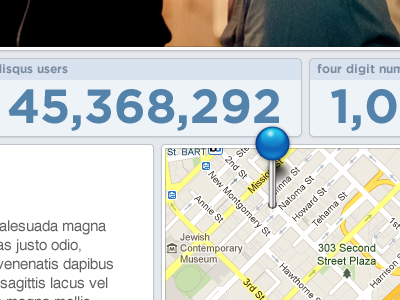
    Here's the first little sneak-peak of what I've been doing since I joined Disqus. I'm currently redesigning the "About" page, and here's a not-yet-finished concept I wanted to share with you guys.

    UPDATE: It's live! disqus.com/about

    8 months ago

  2. Pro For dr Eric Hoffman

    Hot!

    8 months ago

  3. Pro Avatar Charles Riccardi

    Very nice. Love the pin breaking the grid. Nice work.

    Also, I really like the post it note at the bottom of the page. Adds a Snazzy touch.

    likes

    8 months ago

  4. Pro Picture 13 Scott Perket

    Well done.

    8 months ago

  5. Josh Josh Laincz

    Dude this is soo well done.

    8 months ago

  6. Avatar2 Anthony Garand

    Shouldn't you be working on something else? ;)

    likes

    8 months ago

  7. Pro Mason6 Mason Yarnell

    Looking sharp, Brian! Excellent progress on your first Disqus project.

    8 months ago

  8. Square Dan Eden

    Love the hover state of those tooltips =)

    8 months ago

  9. Pro Avatar Jack Bingham

    Nailin' it already.

    8 months ago

  10. Pro Me Brian Benitez

    Thanks for the kind words, homies.

    8 months ago

  11. Pro Portrait Joshua Sortino

    Uhm, yes!

    8 months ago

  12. Pro Bryantflorez-mostache Bryant Florez

    Looking good, Brian!

    8 months ago

  13. Pro Derby Jerett Patterson

    Looking good.

    8 months ago

  14. Screen shot 2011-11-16 at 1 Darren Emory

    Nice and clean. I spy a simpler navigation structure, too. Sweet!

    8 months ago

  15. Pro Avatar-02 Shaun Moynihan

    Looks awesome man, keep up the solid work.... and congrats again =]

    8 months ago

  16. Icona ovo Francesco Fagnani | Man

    This is serious stuff, man.

    likes

    6 months ago

  17. Pro Photo_on_2010-09-23_at_09 Matt McDaniel

    The pin breaking that space is great. Obviously.

    likes

    5 months ago

  18. Pro Me Brian Benitez

    Well, thanks McD :)

    5 months ago

keyboard shortcuts: previous shot next shot L or F like