Face_small

Commit breadcrumb

Commitagain

1 Attachment

7 Responses

  1. Pro Face_small Kyle Neath

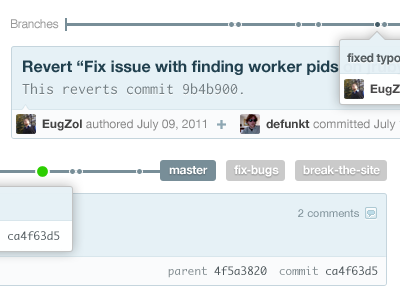
    Trying a different layout this time (attachment for a continuous view)

    10 months ago

  2. Pro Vignette_moi_square Gianni Chiappetta

    I dig. My only input is the comment icon and white direction/attachment indicator (bottom left) are a tad too small. Just a tad. Love it otherwise.

    10 months ago

  3. Pro Philipp datz Philipp Datz

    nice. i like the idea of displaying the timeline of branches/commits visually. really cool

    10 months ago

  4. Pro Rich_thornett_280_gray Rich Thornett

    I plead dumb: What are the dots? Commits on the master branch? Or commits where other branches diverged from master? And how do the other branch names fit in to the timeline?

    My ignorance aside, it looks awesome.

    10 months ago

  5. Pro Face_small Kyle Neath

    @Rich: Don't feel bad, that's what I'm trying to clarify. Not entirely sure how to visualize it yet.

    The branch names are the branches that the commit is reachable from, and when you click them you get that branch's timeline (date-based, like our commit listing). Each dot is a commit, so you can step back/forward in time along that branch.

    At least, that's the idea. We'll see how it pans out.

    likes

    10 months ago

  6. Pro Rich_thornett_280_gray Rich Thornett

    Ah, I see. So the purpose is to see all the branches on which a commit lives, then have a timeline to quickly explore commits on that branch.

    I like this UI and I think what's being shown will probably be more obvious on your site than ours.

    Question: For commits on quite a few branches - how will the branches be chosen/selectable?

    10 months ago

  7. Pro Screen_shot_2011-02-10_at_3 allan branch

    I wish dribbble has a "like" and "boner" link, I'd give this a "boner".

    3 months ago

keyboard shortcuts: previous shot next shot L or F like