Randy

Premix Controls

Premix-controls

5 Responses

  1. Pro Randy Randy Hall

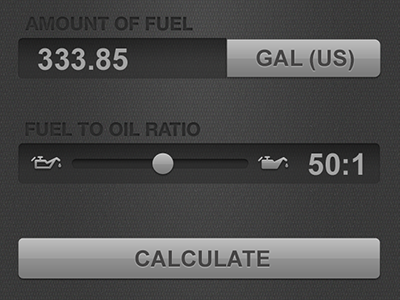
    The UI is coming along nicely. Tapping "GAL (US)" will cycle between GAL (US), GAL (UK), and LITERS. Slider changes the fuel/oil ratio. The only real issue I have with this current UI is the mix slider metaphor vs the actual values. As you slide to the right, the number (50:1) increases, so the empty-to-full oil can icons make sense. But, technically the higher the mix number the less oil you will mix. So, 100:1 is less oil than say 32:1, but the icon shows a "fuller" oil can as you increment the number. So, do I keep it as is with the empty/full oil can meaning increase the mix number from 1:1 to 100:1 or do I change the icon to actually reflect the actual lean/rich mix ratios and amount of oil added? Seems counterintuitive.

    11 months ago

  2. Jim-muirhead Jim Muirhead

    The oil can icons should reflect the actual mix ratios, but I find the placement of the icons and ratio number bothersome. I would consider placing the ratio number outside the slider on the right and then placing the icons at each end of the slider.

    11 months ago

  3. Randy

    Changed slider to separate out the field (I'll need to make that a little bigger to accommodate "100:1" and also flipped the oil icons to represent the amount of oil used, which is inverse to the numeric value of the slider (i.e. 12:1 is more oil than 75:1).

    11 months ago

  4. Pro Randy Randy Hall

    Good suggestions, Jim.

    11 months ago

  5. Clifotosquare

    Whether you include an oil can or a gas tank, it may seem confusing, so try something generic like the attached rough idea.

    By the way, I'm loving the visual refinement on this. It's looking really nice.

    11 months ago

keyboard shortcuts: previous shot next shot L or F like