Twitter-rubin-300px

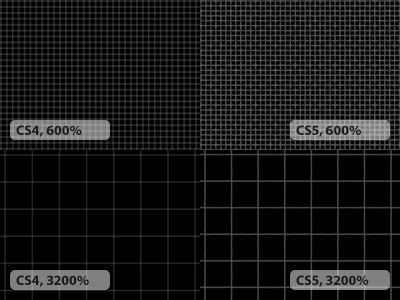
CS4 vs CS5 Pixel Grid

Shot_1273068252

20 Responses

  1. Pro Twitter-rubin-300px Dan Rubin

    Downloaded Photoshop CS5 to see if it was indeed faster than CS4 (and yes, it does a few things faster on my year-old MBP, and doesn't crash on quit, so that's something) and discovered this horrendous change to the Pixel Grid.

    Adobe has taken a useful feature and turned it into complete shit.

    likes

    about 2 years ago

  2. Pro Phil_newavatar2 Phil Coffman

    Well there you go, that's reason enough for me to not upgrade.

    about 2 years ago

  3. Pro Fresh_buzz Anton Peck

    Gah!

    about 2 years ago

  4. Mike mike susz

    bummer, i've been looking forward to upgrading from CS3 for pixel grid, among other features.

    about 2 years ago

  5. Pro Desk Trent Walton

    Double-Gah!

    likes

    about 2 years ago

  6. Op-1 Jesse Dodds

    That's why i just manually set my grid settings in preferences: Grid line every 32 pixels with 32 subdivisions. Could never stand the built in pixel grid in CS4/5.

    about 2 years ago

  7. Pro Hexagon-portrait-square-256 Scott Boms

    So.... I should also assume that they haven't fixed the problem in Illustrator when you set a document's ruler units to one thing, close the document and then open it again and the Transform palette defaults to some other measurement unit entirely... That one's been around since at least the original Creative Suite.

    about 2 years ago

  8. Pro Veer kern Patrick Haney

    Wait, people still use Photoshop? Weirdos.

    about 2 years ago

  9. Davatar-600 Dave Simon

    But does Illustrator CS5 magically add .001 of a pixel to things, and can Photoshop CS5 manage to snap new guides to precisely a pixel, or does it still end up off by .1 of a pixel here and there?

    about 2 years ago

  10. Pro Avatar-80x80 Matt Brett

    Wow! I experienced this first hand this morning. Pixel grid disabled. I don't normally use the grid, but I'm going to try that instead of relying on the pixel grid when magnified.

    about 2 years ago

  11. Pro Fresh_buzz Anton Peck

    Patrick, don't be such a troll.

    about 2 years ago

  12. Pro Twitter-rubin-300px Dan Rubin

    Apparently, this can be fixed (at least on my MBP; it may be video card-specific) by changing the pop-up under Preferences > Performance > GPU Settings > Advanced... to "Basic" — though I'm still not sold on upgrading to CS5.

    about 2 years ago

  13. Me-avatar Josh Pyles

    Interesting. Can't you customize the style of the pixel grid btw? Change colors/transparency?

    about 2 years ago

  14. 180_180 Thomas Maier

    Adobe totally fails at GU Interfacedesign.

    Compare the close/max/minimize buttons on the document window header with the document window header of CS4 or a randow OS X app window header. Thy even failed at placing them right.

    about 2 years ago

  15. Pro Squaredeye_336x336 Matthew Smith

    Are you surprised Adobe does this kind of thing? Its time we band together and get a better product out there.

    about 2 years ago

  16. 4483_93271860801_669265801_2631422_7334166_n Court Kizer

    It's definitely related to your video card settings. For me the 1px layer stroke tool was totally messed up on my new 17" i7 MacBook Pro. I had to switch to basic for video, for the stroke and grid to fix itself.

    Preferences > Performance > GPU Settings > Advanced..

    about 2 years ago

  17. Pro Avatar-80x80 Matt Brett

    Dan, changing the GPU setting to Basic did the trick for me as well. Nice! One less thing to complain about.

    likes

    about 2 years ago

  18. Pro Twitter-rubin-300px Dan Rubin

    @Matthew: No, and Hell Yes, respectively.

    about 2 years ago

  19. Pro 74c32cfc-4d0f-4643-8ca0-e8cbc21956ac Bryan Veloso

    This doesn't strike me as odd at all because my pixel grid currently looks like that of your CS5 screenshot (and I'm running CS4). I guess I should try that video setting thing as well.

    about 2 years ago

  20. Avatar Andy Birchwood

    i'm a strong supporter of pixelmator . It has mucho potential- but I'm not ready to switch yet.

    about 2 years ago

keyboard shortcuts: previous shot next shot L or F like