Stan_color

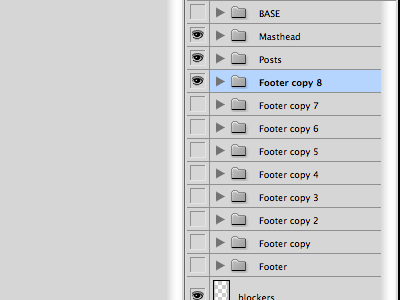
Footers

Screen_shot_2011-05-18_at_11

24 Responses

  1. Pro Stan_color Jason Santa Maria

    Well, that took a lot more time to work out than I thought it would.

    likes

    about 1 year ago

  2. Pro Afd-newlogo-forum Aurélien Foutoyet

    Oh ! This shot reminds me something :)

    about 1 year ago

  3. Twitter2 Blake McDivitt

    Typical. Bogging photoshop down!

    about 1 year ago

  4. Avatar_bigger Martin Parets

    are you sure about that one thing in that one spot? i dunno, it could use some tweaking. i think "footer copy 9" is calling your name.

    likes

    about 1 year ago

  5. Pro 1f8f6ded95a14175acba6c272c967787_7 Philip Renich

    @Martin - I love your avatar.

    The End.

    likes

    about 1 year ago

  6. Pro Screen_shot_2011-02-04_at_3 matt

    AHHHH, I hate Photoshop layer copy naming conventions. I will upgrade to CS5 if not only to just to fix that.

    about 1 year ago

  7. Pro 12469_535997974179_57801549_31859184_2129908_n Paul Russo

    I'm pretty sure there is a CS4 fix for the "copy" - the CS5 fix is extremely convenient

    about 1 year ago

  8. Avatar-zonder-rand Thomas Byttebier

    Wondering what the blockers layer is doing.

    about 1 year ago

  9. Pro Stan_color Jason Santa Maria

    @Thomas Byttebier: Blocking stuff :)

    But really: I work on a wide canvas so that I can see what a site will look like on a wide display and use the "blockers" layer to instantly show me the same layout on something smaller (like 1024px wide displays). I color the blockers layer the same grey as Photoshop's window background, so that it blends in seamlessly.

    likes

    about 1 year ago

  10. Mr4 Jeff Daley

    @matt, You can turn that off in the panel options (thank goat).

    Also great: unchecking "Expand New Effects."

    Edit: Just realized it might be a CS5-only option. So yes, upgrade.

    about 1 year ago

  11. Pro Callum-chapman-17 Callum Chapman

    Yeah it's a CS5 option Jeff. It's one of the main reasons I want to upgrade, which kinda sucks!

    about 1 year ago

  12. Pro Tux Brad Haynes

    Wow, thanks Jeff. Those have always bothered me!

    about 1 year ago

  13. Pro Avatar Andrew Lucas

    You haven't coloured the folders properly! Shame on you.

    about 1 year ago

  14. Fotito Juan Gomez

    i think we're almost done, please use the icons on number 2 the type on 4 i want the divider of 3 and the effects of 8, and let me look at two variations one with the effects of 8 and one with the effects of 7.

    likes

    about 1 year ago

  15. Avatar-personal_normal Damien van Holten

    Needs more depth.

    about 1 year ago

  16. Pro Jonathan_hoefler Jonathan Hoefler

    I usually have one about half way down called "final FINAL footer," which then has eleven further refined versions.

    likes

    about 1 year ago

  17. Pro Stan_color Jason Santa Maria

    @Jonathan Hoefler: Insult to injury, this file is JSM-rough-home-1.6.psd :)

    about 1 year ago

  18. Pro Stan_color Jason Santa Maria

    Still rough, but this is the footer I was working on.

    about 1 year ago

  19. Apple-touch-icon Luke Dorny

    Final revision 4-C, this time I mean it.

    likes

    about 1 year ago

  20. Pro Jonathan_hoefler Jonathan Hoefler

    Reorganized a bunch of stuff on the server recently, and I see that some wag has set up a folder called "Earlier final files."

    likes

    about 1 year ago

  21. Pro Me Mike Finch

    The next time an earthquake destroys a country, as an improv-charity, you should auction-off some of your old PSDs. I bet you'd be surprised how much money you'd get for your old, 9-versioned-footer files.

    about 1 year ago

  22. Pro 1f8f6ded95a14175acba6c272c967787_7 Philip Renich

    @Mike, so... auction begins this Saturday just after 6pm? ;-)

    about 1 year ago

  23. Dribbble-avatar Jozsef Deak

    Not only by you. Footers make me a lot of headache too, and the rest of the site too.

    12 months ago

  24. Pro Me Michal Kopanski

    i like it, but can you make it pop?

    12 months ago

keyboard shortcuts: previous shot next shot L or F like