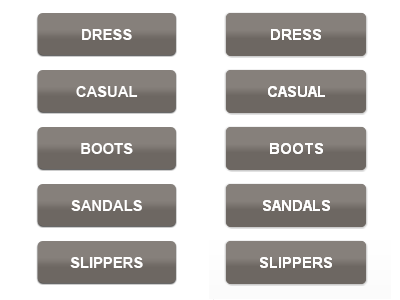
Disclaimer: The design of the buttons is not mine. The CSS3 implementation of the Photoshop mockup is.
The original from Photoshop on the left, the CSS3 interpretation of them on the right.
Linear-gradient, box-shadow, and border-radius. Good stuff!
The basic code (assume all proper vendor extensions):
.col ul a { background-image: -moz-linear-gradient(top, #86807b 20%, #86807b, #6d6762 60%, #6d6762); /* FF3.6 */ border-radius: 5px; box-shadow: 1px 1px 1px #c4c4c4, -1px 0 1px #c4c4c4; color: #fff; display: block; font-size: 15px; font-weight: bold; height: 30px; /* 43 */ margin: 0 0 14px 0; padding: 13px 0 0 0; text-align: center; text-decoration: none; text-transform: uppercase; width: 140px; }
about 2 years ago
Nice... you can also use filter to target IE browsers, just google it... Also I know you didn't do the design, but I would put a light text shadow on the text to help it pop a little. Try text-shadow: 0 -1px 2px rgba(0, 0, 0, .25);
Yeah, I know of all the IE extensions as well. This will end up running on a kiosk so hoping at the moment that IE won't be a worry.
Thanks for the note about text-shadow, it looks nice!
keyboard shortcuts: ← previous shot → next shot L or F like
3 Responses
Disclaimer: The design of the buttons is not mine. The CSS3 implementation of the Photoshop mockup is.
The original from Photoshop on the left, the CSS3 interpretation of them on the right.
Linear-gradient, box-shadow, and border-radius. Good stuff!
The basic code (assume all proper vendor extensions):
.col ul a {
background-image: -moz-linear-gradient(top, #86807b 20%, #86807b, #6d6762 60%, #6d6762); /* FF3.6 */
border-radius: 5px;
box-shadow: 1px 1px 1px #c4c4c4, -1px 0 1px #c4c4c4;
color: #fff;
display: block;
font-size: 15px;
font-weight: bold;
height: 30px; /* 43 */
margin: 0 0 14px 0;
padding: 13px 0 0 0;
text-align: center;
text-decoration: none;
text-transform: uppercase;
width: 140px;
}
about 2 years ago
Nice... you can also use filter to target IE browsers, just google it... Also I know you didn't do the design, but I would put a light text shadow on the text to help it pop a little. Try text-shadow: 0 -1px 2px rgba(0, 0, 0, .25);
about 2 years ago
Yeah, I know of all the IE extensions as well. This will end up running on a kiosk so hoping at the moment that IE won't be a worry.
Thanks for the note about text-shadow, it looks nice!
about 2 years ago