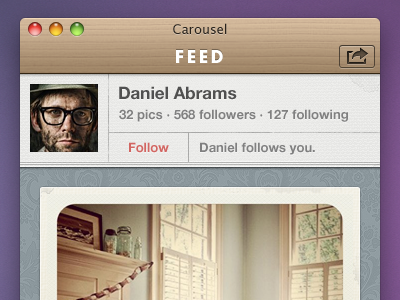
Extending the nav bar style into the title bar. Also showing the user bar here, which is displayed when you drill down into a profile. Getting closer...
@Mitch, I feel ya, unfortunately it has to be an opaque color and in the default feed view that green background is right up against it. Had to pick a color dark enough for a number of cases.
@Eddie well, you've already veered by making a custom title bar, custom button style, etc. Why stop now? Are you also planning on using jelly buttons throughout the app? Have you looked at Twitter.app or any of the other custom-but-still-mac-feeling apps?
@Eddie per mitch's suggestion, why not just change the opaque color to this one when you are in the default feed view. Otherwise, make this one a bit lighter.
@Rogie, @Mitch might be worth investing the time to customize that. Right now we're using the Chameleon framework and it just accepts a single image for the background. Could extend the class to draw the line conditionally.
@Eddie yeah, I've been down this whole custom mac ui road recently. It's hard to know how far is too far. But when its custom, well, its custom. I feel like its MOST important to make it feel and look like a Mac app, but not necessarily obey every [default] visual style.
@Rogie, I'm with ya on that one. Once we get this thing out the door (any day now) I'll invest some time into a monotone version in 1.1. Definitely worth investigating. Thanks.
Rogie is perfectly right. Form follows function, as design follows direction.
I think the best custom interfaces are those that have the subtle custom touches. Right now you're on a good road, though I've gotta say I don't agree with custom typography within the windows themselves, especially when it's set in titling type. This whole area just doesn't feel right: http://cl.ly/6QqO
Perhaps, at the top, you could have "Carousel - Feed" as apposed to an independent title. I know the fat top bar is a nice look, but getting rid of that custom type doesn't mean it has to go, you've still got that big button that'll keep it fat.
Edit: I understand that I could perhaps be a little too conservationist when it comes to interfaces. That custom typography isn't a bad thing, I just personally don't think it works. Don't take my opinions as guidance unless you also see sense in them. :D
@Mitch I would be sweet to compact the two but the top bar is actually a titlebar+navbar so they have to be stacked. If we crunched them then the stoplight would be where our back button is in the stack. Its a compromise.
The typography is a big risk, but once the app it out I think it will quantify itself when you see the inspiration for the branding. Think Wes Anderson movies.
@Eddie: I was in a similar situation to you a while ago, except with an iPhone app. I don't think it's a good idea to stretch the branding too far into the application. Basically, my branding elements were wood and grass. As far as I was concerned, a wooden top bar would be as far as I would go. They said they wanted different fonts for every title. I said hell no. iPhone and Mac applications work best when their interfaces look as native as possible. There's a very fine line between original interfaces and tacky interfaces. When one starts to add too many branding-appropriate details into an application, it starts to spoil the experience. If your branding already contains good use of Futura, why is it important to have it relayed in the application? Isn't it better to have little subtle reminders of the branding instead?
It's the subtle custom touches that make the branding direction start to show in the application. For that reason, I'd remove the custom type, but of course keep the wooden window.
34 Responses (page 1 of 2)
Extending the nav bar style into the title bar. Also showing the user bar here, which is displayed when you drill down into a profile. Getting closer...
about 2 years ago
Pro
Rogie
GAH! Looks good, but please please redo the traffic lights!
about 2 years ago
nice subtle textures.
about 2 years ago
@Rogie. What would you suggest? I wouldn't want to veer to far away from standard.
about 2 years ago
Gotta lower the opacity of that black line below the top bar.
about 2 years ago
@Mitch, I feel ya, unfortunately it has to be an opaque color and in the default feed view that green background is right up against it. Had to pick a color dark enough for a number of cases.
about 2 years ago
Please don't modify the traffic lights! Looks perfect as it is now :)
about 2 years ago
Pro
Rogie
@Eddie well, you've already veered by making a custom title bar, custom button style, etc. Why stop now? Are you also planning on using jelly buttons throughout the app? Have you looked at Twitter.app or any of the other custom-but-still-mac-feeling apps?
about 2 years ago
@Rogie, ya it's something to consider. Maybe the exactly same visual style, but muted, or monotone (like twitter.app).
about 2 years ago
Pro
Rogie
@Eddie per mitch's suggestion, why not just change the opaque color to this one when you are in the default feed view. Otherwise, make this one a bit lighter.
about 2 years ago
@Rogie, @Mitch might be worth investing the time to customize that. Right now we're using the Chameleon framework and it just accepts a single image for the background. Could extend the class to draw the line conditionally.
about 2 years ago
Pro
Rogie
@Eddie yeah, I've been down this whole custom mac ui road recently. It's hard to know how far is too far. But when its custom, well, its custom. I feel like its MOST important to make it feel and look like a Mac app, but not necessarily obey every [default] visual style.
about 2 years ago
Supa :)
about 2 years ago
@Rogie, I'm with ya on that one. Once we get this thing out the door (any day now) I'll invest some time into a monotone version in 1.1. Definitely worth investigating. Thanks.
about 2 years ago
Pro
Liam McKay
Such a beautiful feel to this, all the best of luck with it.
about 2 years ago
Pro
Prathyush
Great use of textures. The wooden title bar, damask wall and the rugged paper give it a more of an interior decor character.
about 2 years ago
Rogie is perfectly right. Form follows function, as design follows direction.
I think the best custom interfaces are those that have the subtle custom touches. Right now you're on a good road, though I've gotta say I don't agree with custom typography within the windows themselves, especially when it's set in titling type. This whole area just doesn't feel right: http://cl.ly/6QqO
Perhaps, at the top, you could have "Carousel - Feed" as apposed to an independent title. I know the fat top bar is a nice look, but getting rid of that custom type doesn't mean it has to go, you've still got that big button that'll keep it fat.
Edit: I understand that I could perhaps be a little too conservationist when it comes to interfaces. That custom typography isn't a bad thing, I just personally don't think it works. Don't take my opinions as guidance unless you also see sense in them. :D
about 2 years ago
Pro
Christopher Downer
It's nice. It looks really great! I just don't know why there are two titles. It seems very unnecessary to me.
And I agree with Tobias. Modify the traffic lights and the whole thing will be ruined.
about 2 years ago
Pro
Paul Ungureanu
Nice, but IMO the white FEED text doesn't match the rest of the design.
about 2 years ago
Pro
Rogie
I'm a big fan of your direction for sure and I think it's worth the effort to pursue further, and I totally think this will work.
It's like Mitch is in my head. His thoughts = my thoughts.
about 2 years ago
@Mitch I would be sweet to compact the two but the top bar is actually a titlebar+navbar so they have to be stacked. If we crunched them then the stoplight would be where our back button is in the stack. Its a compromise.
The typography is a big risk, but once the app it out I think it will quantify itself when you see the inspiration for the branding. Think Wes Anderson movies.
about 2 years ago
Pro
David Hellmann
pls add me to the beta team, that looks so awesome!!!
about 2 years ago
@Eddie: I was in a similar situation to you a while ago, except with an iPhone app. I don't think it's a good idea to stretch the branding too far into the application. Basically, my branding elements were wood and grass. As far as I was concerned, a wooden top bar would be as far as I would go. They said they wanted different fonts for every title. I said hell no. iPhone and Mac applications work best when their interfaces look as native as possible. There's a very fine line between original interfaces and tacky interfaces. When one starts to add too many branding-appropriate details into an application, it starts to spoil the experience. If your branding already contains good use of Futura, why is it important to have it relayed in the application? Isn't it better to have little subtle reminders of the branding instead?
It's the subtle custom touches that make the branding direction start to show in the application. For that reason, I'd remove the custom type, but of course keep the wooden window.
about 2 years ago
@Rogie - It's like we're clones of eachother for sure, you must be the more successful and net-social version. :D
about 2 years ago
Pro
Rogie
@Mitch I'm the skynet version.
about 2 years ago