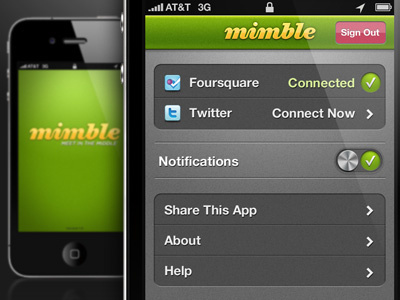
Mimble Settings

10 Responses

  1. Dan Sullivan Dan Sullivan

    Settings screen for Mimble. Feedback is welcome!

    about 2 years ago

  2. Adi Hezral Adi Hezral

    love the color scheme

    about 2 years ago

  3. Dan Sullivan Dan Sullivan

    Thanks Adi!

    about 2 years ago

  4. Ricardo Salazar Ricardo Salazar

    I like it. Except for the Notifications button, it looks a bit weird or congested.

    about 2 years ago

  5. Mike Precious Mike Precious

    Grey and green - great colour combo. Design breaths well. Wondering if lines above and below Notifications should be the same. Appears the one line is a bit thicker.

    about 2 years ago

  6. Dan Sullivan Dan Sullivan

    Good catch Mike, I didn't notice that when resizing. Thanks for your feedback, I'm a fan of your work and really appreciate your insight.

    about 2 years ago

  7. Eric Hoffman Eric Hoffman

    Love it dude! My only gripe is the notifications toggle. I would default to Apples native UI for that one.
    Also agree with Mike about the border on the top of the notifications.
    Other than that... Awesome!

    about 2 years ago

  8. Dan Sullivan Dan Sullivan

    Thanks Eric. Totally agree about that top line but why would you prefer the default toggle? I do feel mine is a bit cramped, and am planning on elongating it to be more accessible.

    about 2 years ago

  9. Eric Hoffman Eric Hoffman

    Apple's native UI brings consistency to an app making it feel like some one is using your app via the iOS. Its a small gripe. I think your toggle looks cool but just feels a little un-Apple. Who am I though? Your stuff looks great!

    about 2 years ago

  10. Dan Sullivan Dan Sullivan

    Thanks Eric! I admire a lot of your work and really appreciate your constructive criticism.

    about 2 years ago

keyboard shortcuts: previous shot next shot L or F like