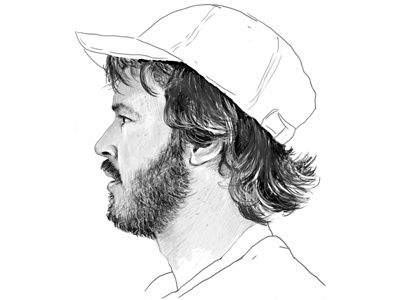
Another sketch with the Wacom tablet, this time drawing form a picture of Greg in a stupid hat. Hoping he'll let me use this for a forthcoming collaboration between us.
Fantastic work. The trick is to keep this up. Once you adapt to the tablet (and it looks like you have) you'll never go back to a mouse again. Also try Brushes for iPhone (and iPad soon), different experience but awesome as well.
Brian: Yeah, aside from a few quick attempts in the past, this week is my first time with a good tablet, and I already find it really intuitive. Going to try and do a little work with it every day until it feels really natural.
Software is just Photoshop CS4, but it'll work with anything. Tablet is a Wacom Intuos 4 medium. It maps to Photoshop instinctively, but I've enhanced it with additional shortcut options and opacity etc via the pen itself. So, I'm working with the tablet in front of me, making most choices with the pen's pop-ups and tablet quick-keys, or direct in PS, and also working faster with one hand on the keyboard for typical PS shortcuts. It's really fast.
@low: Cruel. Ginger is rarely an option in black and white.
18 Responses
Pro
Simon Collison
Another sketch with the Wacom tablet, this time drawing form a picture of Greg in a stupid hat. Hoping he'll let me use this for a forthcoming collaboration between us.
almost 2 years ago
Pro
Richard Young
Another absolute belter! Loving this set of sketches.
almost 2 years ago
Oh my goodness, this is incredible.
almost 2 years ago
Nicely done, sir.
almost 2 years ago
Pro
Brian Hart
Fantastic work. The trick is to keep this up. Once you adapt to the tablet (and it looks like you have) you'll never go back to a mouse again. Also try Brushes for iPhone (and iPad soon), different experience but awesome as well.
almost 2 years ago
Pro
Simon Collison
Brian: Yeah, aside from a few quick attempts in the past, this week is my first time with a good tablet, and I already find it really intuitive. Going to try and do a little work with it every day until it feels really natural.
almost 2 years ago
Pro
Chad Engle
Wow. Thats awesome. What are you using Simon? Photoshop or Illustrator? (or something else to I guess)
almost 2 years ago
Missing the ginger aspect a bit. :)
almost 2 years ago
What software?! So good.
almost 2 years ago
Pro
Simon Collison
Software is just Photoshop CS4, but it'll work with anything. Tablet is a Wacom Intuos 4 medium. It maps to Photoshop instinctively, but I've enhanced it with additional shortcut options and opacity etc via the pen itself. So, I'm working with the tablet in front of me, making most choices with the pen's pop-ups and tablet quick-keys, or direct in PS, and also working faster with one hand on the keyboard for typical PS shortcuts. It's really fast.
@low: Cruel. Ginger is rarely an option in black and white.
almost 2 years ago
Rebound
Staring Competiton
by Chris Armstrong
Ooo the suspense!
*Sketches by Mr Simon Collison*
almost 2 years ago
Simon: What tablet are you using?
Edit - Saw above. Awesome :)
almost 2 years ago
Pro
Simon Collison
Ralph: Mentioned it a couple of comments above: Using a Wacom Intuos 4, medium-size, with Photoshop CS4.
almost 2 years ago
Pro
Erik Sagen
Simon: Would love to see some sort of blog post or comment on Dribbble about the settings/brushes you use. Lovely work though.
almost 2 years ago
Pro
Simon Collison
Erik: Yeah, initial blog post next week I think. I want to get a bit more proficient before I start pretending to be an expert.
almost 2 years ago
Great work!
almost 2 years ago
Pro
Jake Przespo
Wow, this looks incredible Simon.
almost 2 years ago
real nice work
over 1 year ago