Desk

Delayed Opacity

Delayedopacity

11 Responses

  1. Pro Desk Trent Walton

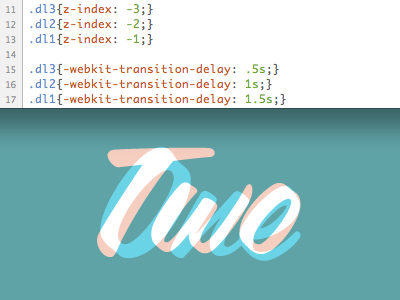
    I've been trying to keep a running list of ideas & examples for experimental CSS3 usage on my local host. I'm finding that the tricky part isn't making this stuff work, it's coming up with how to sensibly implement it on a site.

    Sorry if the code snippet is vague... More to come, I hope.

    about 2 years ago

  2. Twavatar Jeremy Swinnen

    I love these CSS3 articles!

    about 2 years ago

  3. Jasonrobb Jason Robb

    Link to live sample, or it didn't happen. Looks great from here though!

    about 2 years ago

  4. Jack2 Jack Osborne

    I don't think it's vague, I gather from the image that you're trying to creating a countdown where upon the numbers fade out to reveal the next?

    Are you using font-face or something like typekit/fontdeck for this? Or just an image?

    about 2 years ago

  5. Pro Desk Trent Walton

    @Jack Osborne: Good thinking! At the moment, these are just images. I wanted to be sure I had my brain around everything before I started adding elements to the mix. The final product(s) won't be a countdown, but I've got a few more hoops to jump through before I get there.

    about 2 years ago

  6. Billbiwer-profile-alt Bill Biwer

    Love the color combination & typeface choice. Can't wait to see it in action.

    about 2 years ago

  7. Pro Phil_newavatar2 Phil Coffman

    So I'm guessing the blending was done in the images?

    about 2 years ago

  8. Pro Desk Trent Walton

    @Phil Coffman: It's a -transition-property: opacity; fading images from 100% to 0 with a that delay CSS so all the stacked images don't fade at once.

    about 2 years ago

  9. Pro Phil_newavatar2 Phil Coffman

    So that's what's creating the white portions where the words "One" and "Two" intersect?

    about 2 years ago

  10. Pro Desk Trent Walton

    Yes sir, it's mid transition. One is orange with white text and two is blue with white text. I need to get my act together and post this soon!

    about 2 years ago

  11. Pro Desk Trent Walton

    about 2 years ago

keyboard shortcuts: previous shot next shot L or F like