


Faruk-100x100

Little Ipsum

5 Responses

  1. Faruk-100x100 Faruk Ateş

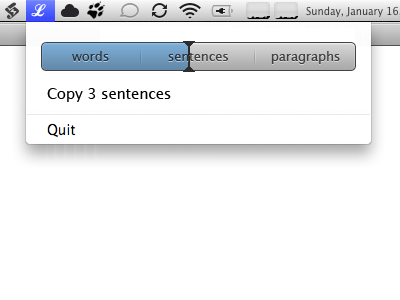
    The idea in this variant is that you drag across the bar and click to copy; while not as charming as Grant’s version, it doesn’t suffer from tiny clickable areas for the words and lines.
    over 1 year ago

  2. Pro Me-200x200 Grant Hutchinson

    I wouldn’t go as far as saying my concept “suffers” from tiny clickable areas, but I do understand the point about users being unable to hit a arguably small target with their cursor.

    And I do like the slider interface as well, especially with the sections delineated with dividers.

    over 1 year ago

  3. Faruk-100x100 Faruk Ateş

    @splorp: I’m sure you wouldn’t, but I personally have had a fair bit of frustration using a trackpad and having to deal with sub-5px interface element distances, which is the gap between clickable areas in your version. IMO, for trackpads that's just a tiny bit too small.

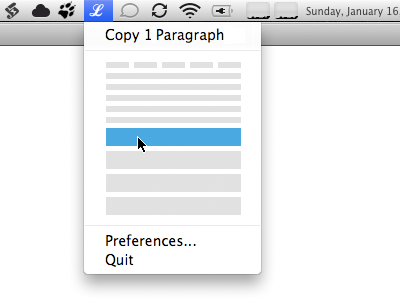
    On Twitter, @twotribes suggested a vertical version. While I feel it would look somewhat awkward, I think it could work quite well. I’d love to see prototypes of each though.

    over 1 year ago

  4. 2 Matthew Walton

    One problem with the labelled areas, is that it limits them to taking up similar areas of the bar, so it doesn't look visually strange.

    But it might be more useful to users to have only 20% of the bar choose words, with 50% choose sentences and 30% choosing paragraphs (for example). This is where the analytics data can be used.

    over 1 year ago

  5. Pro Styled David Keegan

    I am loving the current version. Moving your mouse down from the menu to adjust the length feels more natural then what I imagine going down, then left to right would be like. I also think that the current version is more visually precise because I can see exactly where my mouse needs to go to get the length I want, I can also use muscle memory, I think it would be hard to build muscle memory with this design. But I am always using a mouse so I haven't had any trouble with the click areas.

    about 1 year ago

keyboard shortcuts: previous shot next shot L or F like